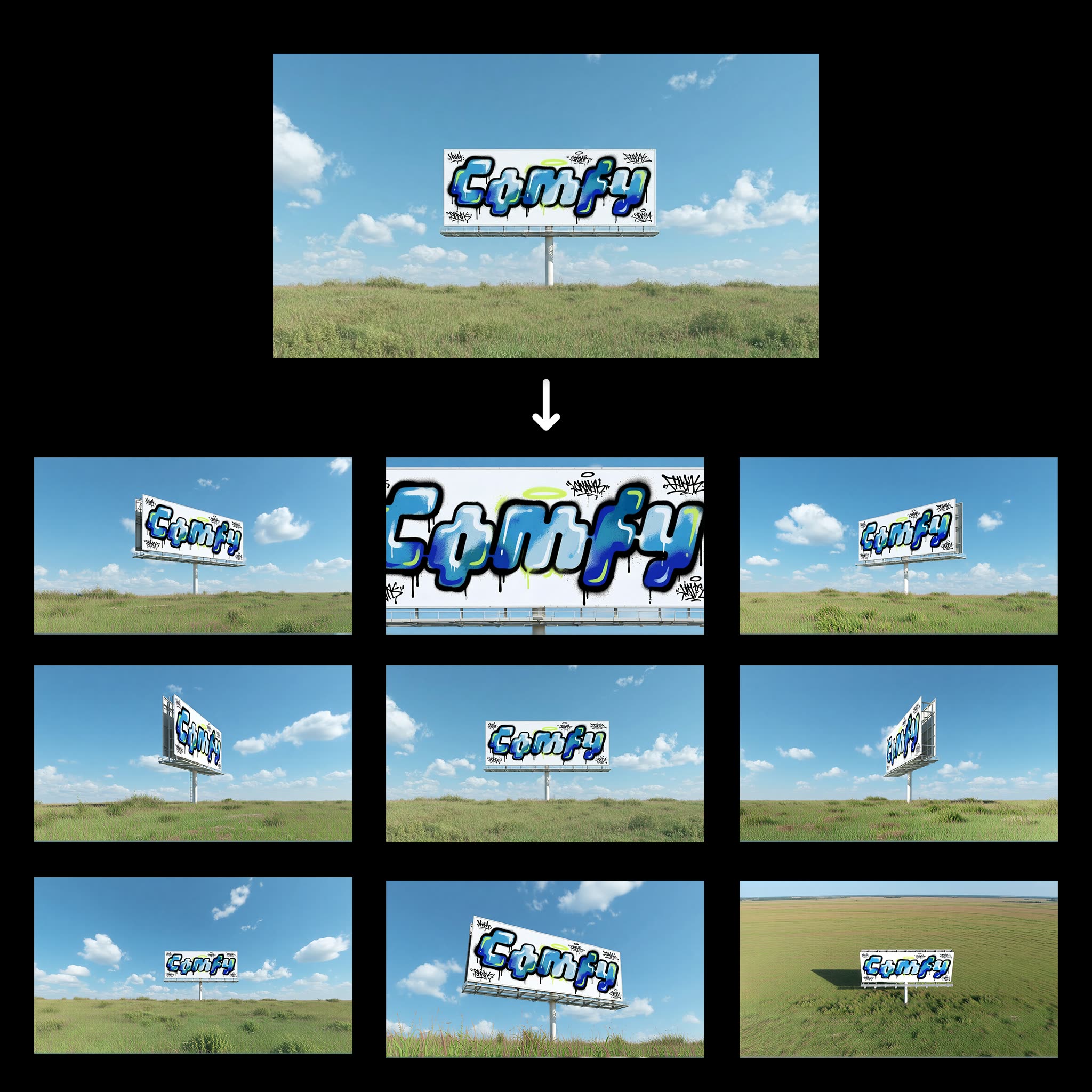
تم تصميم سير عمل "ضغطة واحدة لزوايا متعددة للمشهد" لتبسيط عملية إنشاء عدة منظورات لمشهد معيّن انطلاقًا من صورة واحدة. بالاعتماد على نموذج Qwen-Image-Edit، يحلل سير العمل صورة الإدخال بكفاءة ويولّد زوايا مختلفة، ما يعزز السرد البصري بوجهات نظر متنوعة. يفيد ذلك بشكل خاص في مجالات مثل العمارة وتصميم الألعاب والواقع الافتراضي، حيث تكون رؤية المشهد من عدة زوايا أمرًا مهمًا.
تقنيًا، يبدأ سير العمل بعقدة LoadImage التي تستورد صورة المشهد إلى النظام. يعالج نموذج Qwen-Image-Edit، والمحدد بمعرّف العقدة 0f47377a-2933-4dba-9791-a9c54b078226، الصورة لتوليد منظورات جديدة. ثم يتم حفظ النتائج عبر عقدة SaveImage. يتيح هذا المسار المبسّط تنفيذ تعديلات معقدة على الصور بأقل إدخال ممكن، ما يجعله مفيدًا للمحترفين والهواة.
API
استخدم سير العمل هذا من الكود
كل سير عمل في Comfy هو رسم بياني بصيغة JSON. الحمولة أدناه هي هذا سير العمل بالضبط كما يشغله ComfyUI — يمكنك جلبه من الرابط، حفظه في نظام التحكم بالإصدارات، أو تحميله في ComfyUI وتشغيله عقدة تلو الأخرى.
شغّله من TypeScript أو Python باستخدام Comfy SDK. نفس الكود يعمل على Comfy Cloud أو ComfyUI الذي تستضيفه بنفسك — فقط عنوان URL الأساسي يتغير.
// Install (beta)
npm i @comfyorg/sdk

// Run "زاويا مشهد متعددة بنقرة" (TypeScript)
import { Comfy } from "@comfyorg/sdk";

const client = new Comfy({ apiKey: "comfyui-..." });

// This workflow, exported in API format (see note below)
const wf = await client.workflows.fromFile("templates-1_click_multiple_scene_angles-v1.0_api.json");

const asset = client.assets.fromFile("input.png");
wf.setInput("25", "image", asset);  // LoadImage

const job = await client.run(wf);
await job.getOutputs("43")[0].toFile("output.png");  // SaveImage
يأخذ SDK سير العمل بصيغة API: افتح هذا سير العمل في ComfyUI واستخدم ملف → تصدير سير العمل (API).
يتطلب الوصول إلى Comfy Cloud API خطة تتضمن مفتاح API.
الأسئلة الشائعة


















