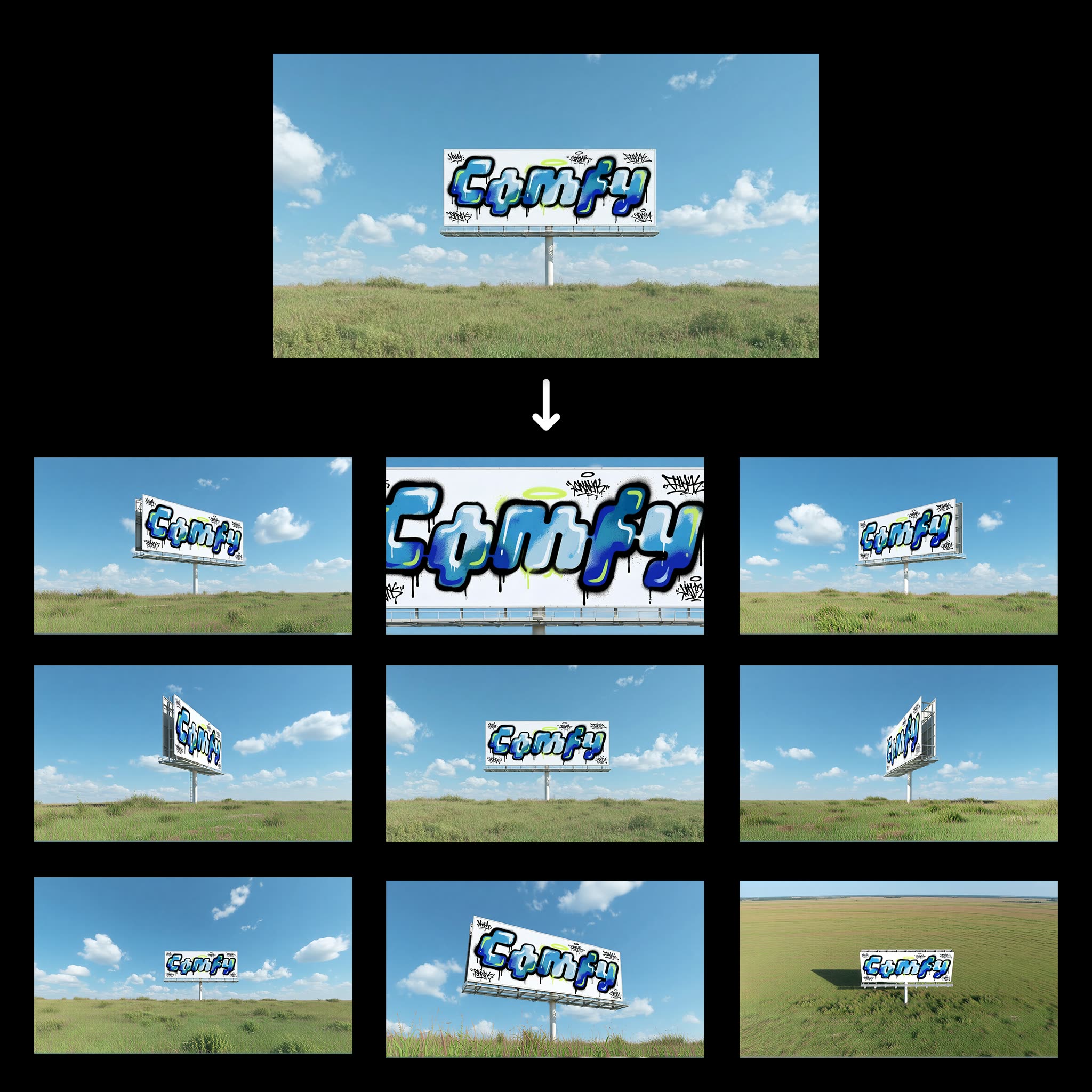
「ワンクリック複数視点生成」ワークフローは、1枚の画像からシーンの多様な視点を簡単に生成するために設計されています。Qwen-Image-Editモデルを活用し、入力画像を解析して様々なアングルを生成し、視覚的なバリエーションを提供します。建築、ゲームデザイン、VRなど、シーンを多角的に把握する必要がある分野で特に有用です。
技術的には、LoadImageノードでユーザーのシーン画像を読み込み、ノードID 0f47377a-2933-4dba-9791-a9c54b078226のQwen-Image-Editモデルが画像を処理して新たな視点を生成します。結果はSaveImageノードで保存されます。最小限の操作で複雑な画像編集が可能となり、プロ・趣味問わず役立つツールです。
API
このワークフローをコードから利用
すべてのComfyワークフローはJSONグラフです。以下のペイロードは、このワークフローそのものであり、ComfyUIが実行する内容と同じです — このURLから取得し、バージョン管理に保存したり、ComfyUIで読み込んでノードごとに実行できます。
Comfy SDKを使ってTypeScriptまたはPythonから実行できます。同じコードでComfy Cloudや自身でホストしたComfyUIのどちらにも対応 — ベースURLだけが異なります。
// Install (beta)
npm i @comfyorg/sdk

// Run "ワンクリック多角度シーン" (TypeScript)
import { Comfy } from "@comfyorg/sdk";

const client = new Comfy({ apiKey: "comfyui-..." });

// This workflow, exported in API format (see note below)
const wf = await client.workflows.fromFile("templates-1_click_multiple_scene_angles-v1.0_api.json");

const asset = client.assets.fromFile("input.png");
wf.setInput("25", "image", asset);  // LoadImage

const job = await client.run(wf);
await job.getOutputs("43")[0].toFile("output.png");  // SaveImage
SDKはAPI形式のワークフローを受け取ります:このワークフローをComfyUIで開き、「ファイル → ワークフローをエクスポート(API)」を使用してください。
FAQ
よくある質問



















Showing 30 of 30 templates