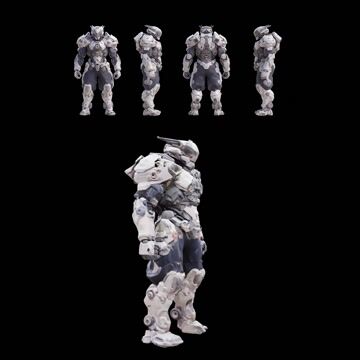
Pixal3D: Multi Views to 3D turns a 4-view character or product turnaround into a textured 3D mesh. The Preprocess Multiview Images group takes either a single multi-view sheet or separate front, back, left, and right images. It can optionally remove the background (LoadBackgroundRemovalModel + RemoveBackground) to isolate the subject and improve consistency. CLIPVisionLoader provides vision conditioning from the views that drives the multi-view reconstruction.
Under the hood, the workflow builds shape first, then texture, and finally bakes it to a UV map. Sparse Structure Generation initializes a 3D latent with EmptyTrellis2LatentStructure. Shape Generation uses Trellis2ShapeStage with ModelSamplingSD3 and KSampler to refine the latent volume into geometry, while CFGOverride and RescaleCFG keep guidance behavior aligned with the original pipeline. VaeDecodeStructureTrellis2/VaeDecodeShapeTrellis turn the latent into a dense voxel grid, VoxelToMesh converts it to a watertight mesh, and DecimateMesh reduces polygon count. Texture Generation uses Trellis2TextureStage (optionally boosted by Trellis2UpsampleStage) and VaeDecodeTextureTrellis to predict appearance, with VAELoader loading the trellis_2_texture_vae_bf16.safetensors VAE. Finally, UnwrapMesh creates UVs and BakeTextureFromVoxel transfers colors to a texture atlas. PreviewImage nodes provide quick visual checks throughout.
The result is a practical, view-consistent 3D model built directly from your turnaround sheet—ideal when you need a clean starting mesh and texture without manual modeling. The multi-view conditioning keeps silhouettes aligned across views and reduces guesswork compared to single-image reconstruction.
API
Use este workflow a partir do código
Todo workflow Comfy é um grafo JSON. O payload abaixo é este workflow, exatamente como o ComfyUI executa — obtenha-o pela URL, mantenha-o no controle de versão ou carregue-o no ComfyUI e execute nó por nó.
Execute a partir de TypeScript ou Python com o Comfy SDK. O mesmo código serve para o Comfy Cloud ou um ComfyUI hospedado por você — apenas a URL base muda.
// Install (beta)
npm i @comfyorg/sdk

// Run this workflow (TypeScript)
import { Comfy } from "@comfyorg/sdk";

const client = new Comfy({ apiKey: "comfyui-..." });
const wf = await client.workflows.fromFile("workflow_api.json");
const job = await client.run(wf);
await job.getOutputs("<output-node-id>")[0].toFile("output.png");
O SDK utiliza um workflow no formato API: abra este workflow no ComfyUI e use Arquivo → Exportar Workflow (API).
O acesso à API do Comfy Cloud requer um plano com chave de API.


















