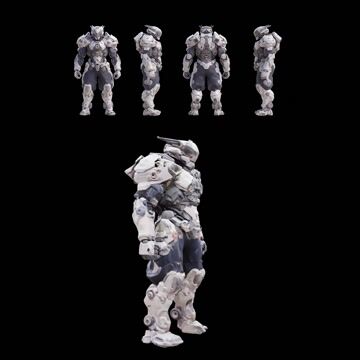
Pixal3D: Multi Views to 3D turns a 4-view character or product turnaround into a textured 3D mesh. The Preprocess Multiview Images group takes either a single multi-view sheet or separate front, back, left, and right images. It can optionally remove the background (LoadBackgroundRemovalModel + RemoveBackground) to isolate the subject and improve consistency. CLIPVisionLoader provides vision conditioning from the views that drives the multi-view reconstruction.
Under the hood, the workflow builds shape first, then texture, and finally bakes it to a UV map. Sparse Structure Generation initializes a 3D latent with EmptyTrellis2LatentStructure. Shape Generation uses Trellis2ShapeStage with ModelSamplingSD3 and KSampler to refine the latent volume into geometry, while CFGOverride and RescaleCFG keep guidance behavior aligned with the original pipeline. VaeDecodeStructureTrellis2/VaeDecodeShapeTrellis turn the latent into a dense voxel grid, VoxelToMesh converts it to a watertight mesh, and DecimateMesh reduces polygon count. Texture Generation uses Trellis2TextureStage (optionally boosted by Trellis2UpsampleStage) and VaeDecodeTextureTrellis to predict appearance, with VAELoader loading the trellis_2_texture_vae_bf16.safetensors VAE. Finally, UnwrapMesh creates UVs and BakeTextureFromVoxel transfers colors to a texture atlas. PreviewImage nodes provide quick visual checks throughout.
The result is a practical, view-consistent 3D model built directly from your turnaround sheet—ideal when you need a clean starting mesh and texture without manual modeling. The multi-view conditioning keeps silhouettes aligned across views and reduces guesswork compared to single-image reconstruction.
API
從程式碼使用此工作流
每個 Comfy 工作流都是一個 JSON 圖。下方的 payload 就是此工作流,與 ComfyUI 執行時完全相同 — 你可以從此 URL 取得、放入版本控制,或在 ComfyUI 載入並逐節點執行。
使用 Comfy SDK 以 TypeScript 或 Python 執行。相同程式碼可用於 Comfy Cloud 或你自架的 ComfyUI — 只需更改 base URL。
// Install (beta)
npm i @comfyorg/sdk

// Run this workflow (TypeScript)
import { Comfy } from "@comfyorg/sdk";

const client = new Comfy({ apiKey: "comfyui-..." });
const wf = await client.workflows.fromFile("workflow_api.json");
const job = await client.run(wf);
await job.getOutputs("<output-node-id>")[0].toFile("output.png");
SDK 需使用 API 格式的工作流:請在 ComfyUI 開啟此工作流,並使用 檔案 → 匯出工作流(API)。


















