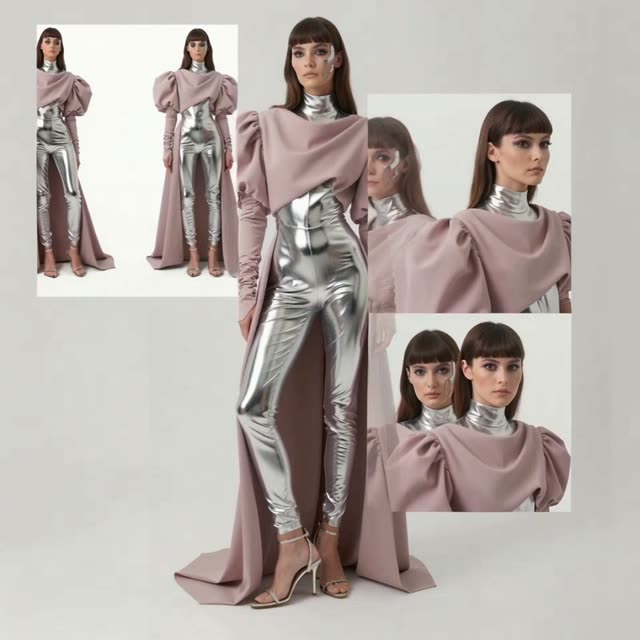
The '360 Full-body Turnaround' workflow is designed to generate comprehensive 360-degree views of a character, offering both full-body and close-up perspectives. This workflow is particularly useful for artists, animators, and designers who need to visualize a character from multiple angles. By leveraging the Gemini3 Pro Image Preview model, this workflow ensures high-quality image outputs that maintain consistency across different views. The process begins with the LoadImage node, where a character image is uploaded. The GeminiImage2Node then processes the image to create multiple angle views. These images are seamlessly combined using the ImageStitch node, resulting in a smooth 360-degree turnaround. The workflow concludes with the SaveImage node, which allows users to export the final composite image.
API
Use this workflow from code
Every Comfy workflow is a JSON graph. The payload below is this workflow, exactly as ComfyUI runs it — fetch it from the URL, keep it in version control, or load it in ComfyUI and run it node by node.
Run it from TypeScript or Python with the Comfy SDK. The same code targets Comfy Cloud or a ComfyUI you host yourself — only the base URL changes.
// Install (beta)
npm i @comfyorg/sdk

// Run "360 Full-body Turnaround" (TypeScript)
import { Comfy } from "@comfyorg/sdk";

const client = new Comfy({ apiKey: "comfyui-..." });

// This workflow, exported in API format (see note below)
const wf = await client.workflows.fromFile("templates-character_sheet_api.json");

const asset = client.assets.fromFile("input.png");
wf.setInput("1", "image", asset);  // LoadImage

const job = await client.run(wf);
await job.getOutputs("4")[0].toFile("output.png");  // SaveImage
The SDK takes a workflow in API format: open this workflow in ComfyUI and use File → Export Workflow (API).
Comfy Cloud API access requires a plan with an API key.
FAQ


















