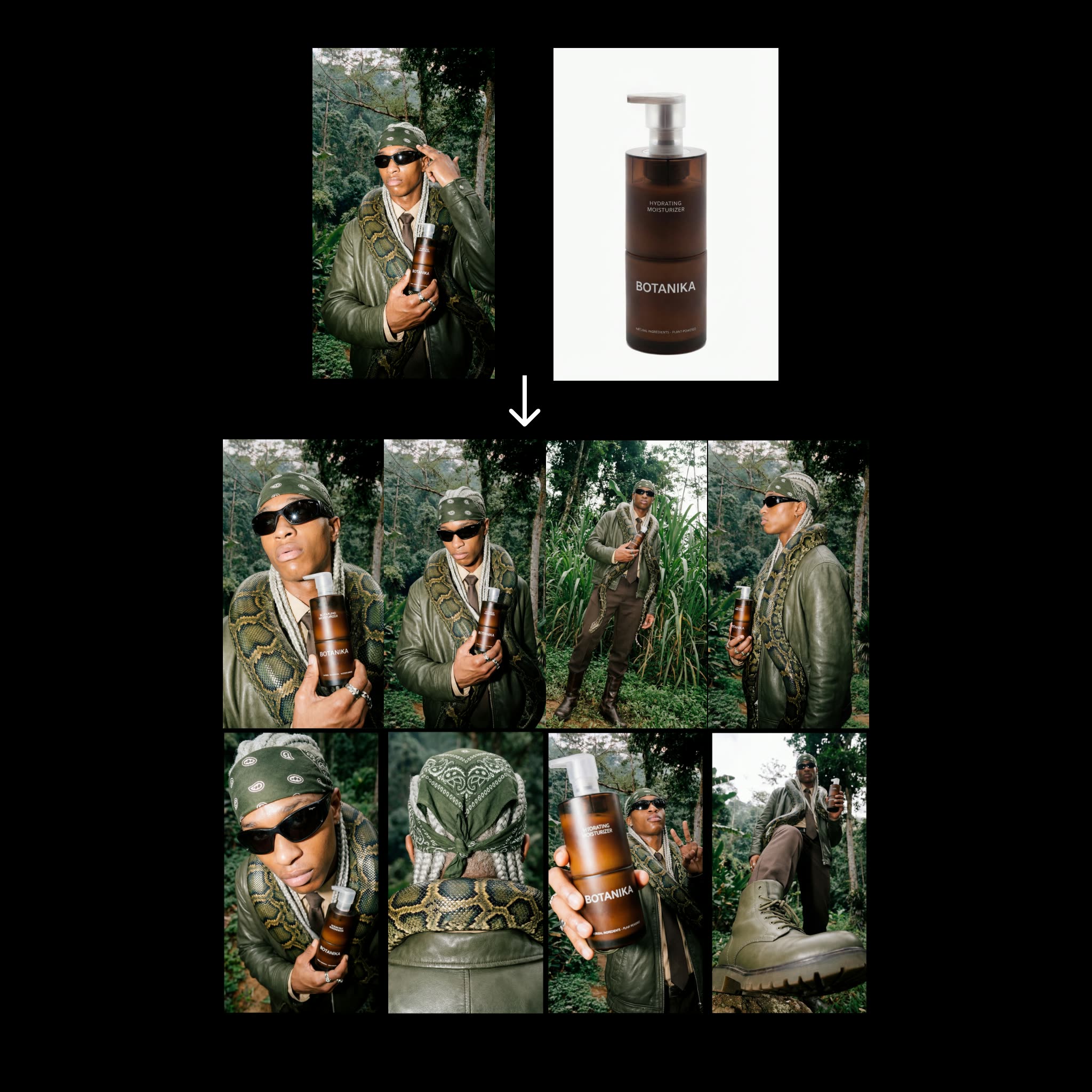
يبني سير عمل ComfyUI هذا مُولِّدًا سريعًا وقابلًا للتكرار لورقة تواصل لمنتجات الموضة. تُدخل مدخلين—مرجعًا لتحرير أزياء وصورة منتج نظيفة—ويُنتج المخطط ثماني زوايا مختلفة مع الحفاظ على هوية المنتج. تعتمد السلسلة على Nano Banana Pro لتوليد الصور وتستخدم مجموعة صغيرة وثابتة من المطالبات لخلق تنوّع دون الابتعاد عن شكل المنتج. يتم تجميع المخرجات في ورقة تواصل عمودية بنسبة 9:16 بدقة 4K (2160x3840) للمراجعة السريعة أو للتسليم لفرق السوشيال/التسويق.
تقنيًا، يستخدم المخطط LoadImage لإدخال مرجع التحرير وصورة المنتج. تحتفظ عقدة PrimitiveStringMultiline بتوجيهات الزوايا الثمانية (يمكنك تعديلها لتغيير وجهات النظر)، بينما تخزّن PrimitiveNode إعدادات رقمية بسيطة (مثل عدد الزوايا أو البذور). يمكن استخدام GeminiImage2Node (مضبوطة على gemini-3-pro-image-preview) كمساعد لتحليل مرجع التحرير أو لإنتاج نص توصيفي يُغذّي كتلة المطالبة لديك. تتولى عقدتان من essentials (المعرّفان 68c58c16-e698-45a4-97f9-54ae8eb9dee9 و487baed2-dc27-49c3-a6b2-0bf45a53e64d من comfyui_essentials) تجميع الصور وتنسيق التخطيط، حيث يقوم BatchImagesNode بتجميع النتائج الثمانية، ويقوم RegexReplace بتنظيف أسماء الملفات، ثم يكتب SaveImage ورقة تواصل واحدة بتخطيط 8 صور مع خيار حفظ الإطارات الفردية. النتيجة هي خطوة مدمجة وموثوقة توسّع عمليتَي توليد فقط من Nano Banana إلى ثماني زوايا متسقة.
API
استخدم سير العمل هذا من الكود
كل سير عمل في Comfy هو رسم بياني بصيغة JSON. الحمولة أدناه هي هذا سير العمل بالضبط كما يشغله ComfyUI — يمكنك جلبه من الرابط، حفظه في نظام التحكم بالإصدارات، أو تحميله في ComfyUI وتشغيله عقدة تلو الأخرى.
شغّله من TypeScript أو Python باستخدام Comfy SDK. نفس الكود يعمل على Comfy Cloud أو ComfyUI الذي تستضيفه بنفسك — فقط عنوان URL الأساسي يتغير.
// Install (beta)
npm i @comfyorg/sdk

// Run "الخطوة 2: سير عمل ورقة الاتصال" (TypeScript)
import { Comfy } from "@comfyorg/sdk";

const client = new Comfy({ apiKey: "comfyui-..." });

// This workflow, exported in API format (see note below)
const wf = await client.workflows.fromFile("template_contact_sheet-step_2.app_api.json");

const asset = client.assets.fromFile("input.png");
wf.setInput("16", "image", asset);  // LoadImage

const job = await client.run(wf);
await job.getOutputs("88")[0].toFile("output.png");  // SaveImage
يأخذ SDK سير العمل بصيغة API: افتح هذا سير العمل في ComfyUI واستخدم ملف → تصدير سير العمل (API).
يتطلب الوصول إلى Comfy Cloud API خطة تتضمن مفتاح API.
الأسئلة الشائعة


















