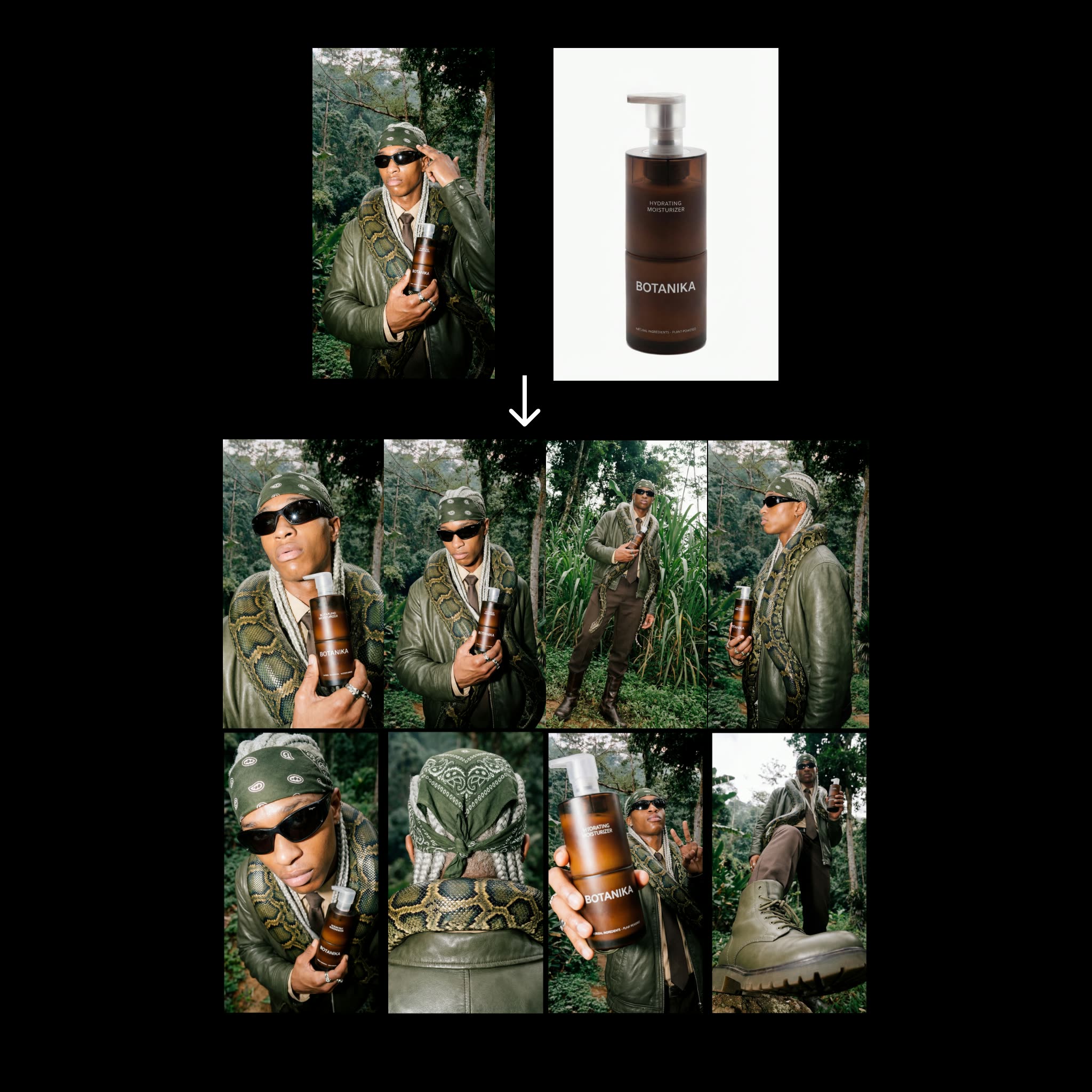
This ComfyUI workflow builds a fast, repeatable contact-sheet generator for fashion products. You provide two inputs—a fashion editorial reference and a clean product image—and the graph produces eight distinct angle variations while preserving product identity. The pipeline pivots on Nano Banana Pro for image generation and uses a small, consistent set of prompts to drive variety without drifting from the product look. Outputs are compiled into a vertical 9:16 contact sheet at 4K resolution (2160x3840) for quick review or social/merchandising handoff.
Technically, the graph uses LoadImage to bring in your editorial reference and product packshot. A PrimitiveStringMultiline node holds the eight angle directives (you can edit these to change viewpoints), while a PrimitiveNode stores simple numeric settings (such as the number of angles or seeds). GeminiImage2Node (configured for gemini-3-pro-image-preview) can be used as a helper to analyze the editorial reference or produce caption text that feeds into your prompt block. Two essentials nodes (UUIDs 68c58c16-e698-45a4-97f9-54ae8eb9dee9 and 487baed2-dc27-49c3-a6b2-0bf45a53e64d from comfyui_essentials) handle image collation and layout with BatchImagesNode assembling the eight results, RegexReplace cleaning file names, and SaveImage writing a single 8-up contact sheet plus optional individual frames. The result is a compact, reliable step that expands only two Nano Banana generations into eight consistent angles.
API
從程式碼使用此工作流
每個 Comfy 工作流都是一個 JSON 圖。下方的 payload 就是此工作流,與 ComfyUI 執行時完全相同 — 你可以從此 URL 取得、放入版本控制,或在 ComfyUI 載入並逐節點執行。
使用 Comfy SDK 以 TypeScript 或 Python 執行。相同程式碼可用於 Comfy Cloud 或你自架的 ComfyUI — 只需更改 base URL。
// Install (beta)
npm i @comfyorg/sdk

// Run "步驟 2:聯系表工作流程" (TypeScript)
import { Comfy } from "@comfyorg/sdk";

const client = new Comfy({ apiKey: "comfyui-..." });

// This workflow, exported in API format (see note below)
const wf = await client.workflows.fromFile("template_contact_sheet-step_2.app_api.json");

const asset = client.assets.fromFile("input.png");
wf.setInput("16", "image", asset);  // LoadImage

const job = await client.run(wf);
await job.getOutputs("88")[0].toFile("output.png");  // SaveImage
SDK 需使用 API 格式的工作流:請在 ComfyUI 開啟此工作流,並使用 檔案 → 匯出工作流(API)。
常見問題


















