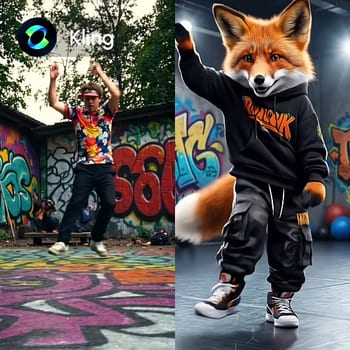
Le workflow « Kling2.6 : Contrôle du Mouvement » permet d’appliquer des actions et expressions précises d’un personnage à partir d’une vidéo de référence sur une image de personnage. Il exploite les capacités du modèle Kling 2.6 pour synchroniser le mouvement, ce qui le rend très utile pour les animateurs et monteurs vidéo souhaitant créer des animations réalistes. Le workflow commence par le nœud LoadVideo, qui importe la vidéo de référence contenant les mouvements souhaités. Le nœud central KlingMotionControl extrait les données de mouvement et les applique à l’image personnage chargée via LoadImage. Enfin, SaveVideo exporte la vidéo animée, garantissant que les mouvements du personnage sont parfaitement synchronisés avec la vidéo de référence.
Ce workflow est particulièrement utile pour sa capacité à préserver l’intégrité des expressions et actions du personnage, assurant une animation naturelle et fluide. Grâce au modèle Kling, reconnu pour sa précision en capture de mouvement, le workflow permet un contrôle détaillé et personnalisable selon les besoins d’animation. Le nœud MarkdownNote permet d’annoter et documenter le processus, facilitant la reproduction ou la modification pour de futurs projets.
API
Utiliser ce workflow depuis le code
Chaque workflow Comfy est un graphe JSON. Le contenu ci-dessous est ce workflow, exactement comme ComfyUI l’exécute — récupérez-le depuis l’URL, gardez-le dans le contrôle de version, ou chargez-le dans ComfyUI et exécutez-le nœud par nœud.
Exécutez-le depuis TypeScript ou Python avec le Comfy SDK. Le même code cible Comfy Cloud ou un ComfyUI auto-hébergé — seule l’URL de base change.
// Install (beta)
npm i @comfyorg/sdk

// Run "Kling2.6 : Contrôle du Mouvement" (TypeScript)
import { Comfy } from "@comfyorg/sdk";

const client = new Comfy({ apiKey: "comfyui-..." });

// This workflow, exported in API format (see note below)
const wf = await client.workflows.fromFile("api_kling_motion_control_api.json");

const asset = client.assets.fromFile("input.png");
wf.setInput("11", "image", asset);  // LoadImage

const job = await client.run(wf);
await job.getOutputs("9")[0].toFile("output.png");  // SaveVideo
Le SDK prend un workflow au format API : ouvrez ce workflow dans ComfyUI et utilisez Fichier → Exporter le workflow (API).
L’accès à l’API Comfy Cloud nécessite un forfait avec clé API.
FAQ


















