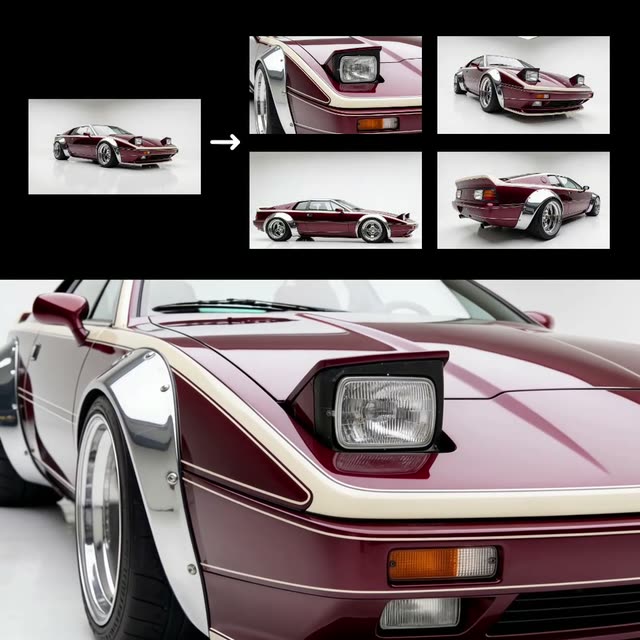
Этот рабочий процесс ComfyUI предназначен для преобразования одного изображения автомобиля в качественное видео, показывающее машину с разных ракурсов. Используя продвинутые ноды, такие как ByteDanceSeedreamNode и модели Kling, рабочий процесс синтезирует реалистичный Видео-выход, имитирующий профессиональные студийные съёмки. Процесс начинается с ноды LoadImage, которая импортирует фото автомобиля. Затем ByteDanceSeedreamNode обрабатывает изображение, генерируя несколько кадров, которые имитируют разные перспективы машины. Эти кадры собираются в цельное видео с помощью ноды CreateVideo.
Особенность этого рабочего процесса — автоматизация создания продуктовых видео автомобиля профессионального уровня всего по одному изображению. Ноды SaveImage и SaveVideo обеспечивают удобное сохранение отдельных кадров и финального видео. Дополнительно Reroute и BatchImagesNode упрощают обработку и передачу данных, делая граф более устойчивым и удобным. Приём полезен для авт-маркетинга и e‑commerce, где нужно улучшать карточки товара динамическим визуальным контентом.
API
Использовать этот рабочий процесс из кода
Каждый рабочий процесс Comfy — это JSON-граф. Ниже представлен payload этого процесса, точно так же, как его запускает ComfyUI: получите его по ссылке, храните в системе контроля версий или загрузите в ComfyUI и выполняйте по узлам.
Запустите его на TypeScript или Python с помощью Comfy SDK. Один и тот же код работает с Comfy Cloud или вашим собственным ComfyUI — меняется только базовый URL.
// Install (beta)
npm i @comfyorg/sdk

// Run "1 фото — видео авто" (TypeScript)
import { Comfy } from "@comfyorg/sdk";

const client = new Comfy({ apiKey: "comfyui-..." });

// This workflow, exported in API format (see note below)
const wf = await client.workflows.fromFile("templates-car_product_api.json");

const asset = client.assets.fromFile("input.png");
wf.setInput("10", "image", asset);  // LoadImage

const job = await client.run(wf);
await job.getOutputs("23")[0].toFile("output.png");  // SaveImage
SDK принимает рабочий процесс в API-формате: откройте этот процесс в ComfyUI и используйте Файл → Экспортировать рабочий процесс (API).
Доступ к API Comfy Cloud требует плана с API-ключом.
FAQ


















