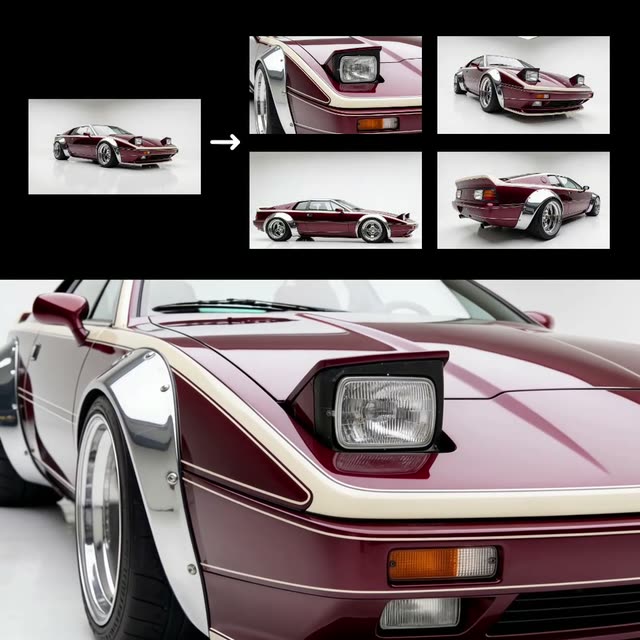
This ComfyUI workflow is designed to transform a single image of a vehicle into a high-quality video showcasing the car from various angles. By leveraging advanced nodes such as the ByteDanceSeedreamNode and Kling models, the workflow synthesizes a realistic video output that mimics professional studio shots. The process begins with the LoadImage node, which imports the vehicle photo. The ByteDanceSeedreamNode then processes the image, generating multiple frames that simulate different perspectives of the car. These frames are compiled into a seamless video using the CreateVideo node.
What sets this workflow apart is its ability to automate the creation of professional-grade car product videos from just one image. The SaveImage and SaveVideo nodes ensure that both individual frames and the final video are stored efficiently. Additionally, the Reroute and BatchImagesNode facilitate smooth data handling and processing, making this workflow both robust and user-friendly. This technique is particularly useful for automotive marketers and e-commerce platforms looking to enhance their product listings with dynamic visual content.
API
Use this workflow from code
Every Comfy workflow is a JSON graph. The payload below is this workflow, exactly as ComfyUI runs it — fetch it from the URL, keep it in version control, or load it in ComfyUI and run it node by node.
Run it from TypeScript or Python with the Comfy SDK. The same code targets Comfy Cloud or a ComfyUI you host yourself — only the base URL changes.
// Install (beta)
npm i @comfyorg/sdk

// Run "1 Image to Car Product Shots" (TypeScript)
import { Comfy } from "@comfyorg/sdk";

const client = new Comfy({ apiKey: "comfyui-..." });

// This workflow, exported in API format (see note below)
const wf = await client.workflows.fromFile("templates-car_product_api.json");

const asset = client.assets.fromFile("input.png");
wf.setInput("10", "image", asset);  // LoadImage

const job = await client.run(wf);
await job.getOutputs("23")[0].toFile("output.png");  // SaveImage
The SDK takes a workflow in API format: open this workflow in ComfyUI and use File → Export Workflow (API).
Comfy Cloud API access requires a plan with an API key.
FAQ


















