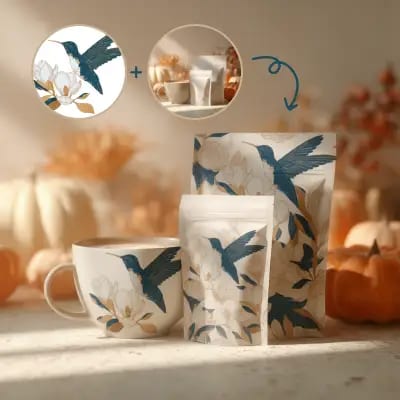
This ComfyUI workflow is designed to create realistic product mockups by applying design patterns to various items such as packaging and mugs. It leverages the Flux.2 Dev model, which is known for its ability to maintain multi-reference consistency, ensuring that the design patterns are applied uniformly across different surfaces and angles. The workflow utilizes several key nodes, including SaveImage and LoadImage, to manage input and output efficiently. Additionally, the workflow incorporates a MarkdownNote node for documentation purposes, and specific nodes identified by unique IDs to handle the image processing tasks. By using quantized weights from the Flux.2 Dev model, this workflow optimizes performance without compromising on quality, making it an excellent choice for designers and marketers who need to visualize product designs quickly and effectively.
API
Use this workflow from code
Every Comfy workflow is a JSON graph. The payload below is this workflow, exactly as ComfyUI runs it — fetch it from the URL, keep it in version control, or load it in ComfyUI and run it node by node.
Run it from TypeScript or Python with the Comfy SDK. The same code targets Comfy Cloud or a ComfyUI you host yourself — only the base URL changes.
// Install (beta)
npm i @comfyorg/sdk

// Run "Product Mockup(Flux.2 Dev FP8)" (TypeScript)
import { Comfy } from "@comfyorg/sdk";

const client = new Comfy({ apiKey: "comfyui-..." });

// This workflow, exported in API format (see note below)
const wf = await client.workflows.fromFile("image_flux2_fp8_api.json");

const asset = client.assets.fromFile("input.png");
wf.setInput("46", "image", asset);  // LoadImage

const job = await client.run(wf);
await job.getOutputs("9")[0].toFile("output.png");  // SaveImage
The SDK takes a workflow in API format: open this workflow in ComfyUI and use File → Export Workflow (API).
Comfy Cloud API access requires a plan with an API key.
FAQ


















