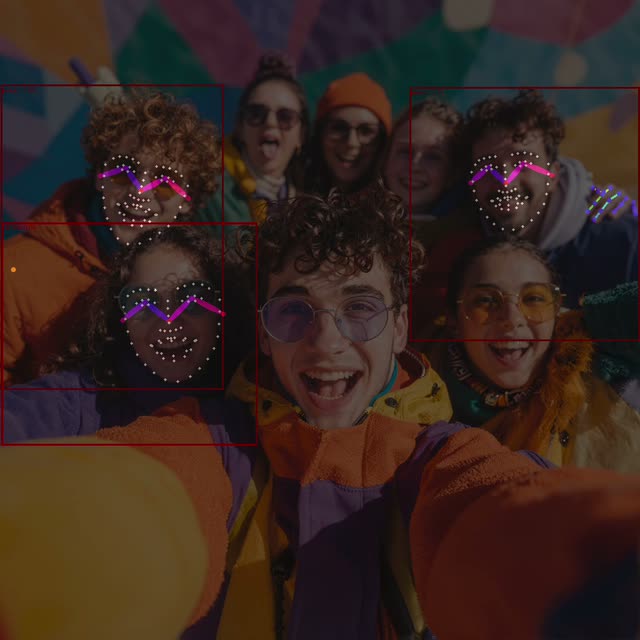
This ComfyUI tutorial workflow runs SDPose-OOD to detect people and their whole‑body pose in a still image, with built‑in support for multi‑person scenes. The core detector is packaged inside a subgraph (node type id 01b6a731-fb78-4070-9a38-c87146da9604) so the top-level canvas stays clean while you still get fast, accurate detections. The pipeline starts with LoadImage, optionally normalizes dimensions via ResizeImageMaskNode, then forwards the image into the SDPose subgraph. Detected persons are visualized using DrawBBoxes and overlaid on the original image with ImageBlend for a readable, non-destructive preview. You can inspect results live with PreviewImage and export them using SaveImage.
What makes this preset useful is how quickly you can go from a raw photo to clear, multi-person pose detections with minimal setup. A PrimitiveInt node exposes max_detections so you can control how many people are returned—handy for crowded scenes. Under the hood, the workflow expects the sdpose_wholebody_fp16.safetensors checkpoint (see Model Links) and can pair with the RT-DETR variant noted in the workflow for robust person localization. If you need deeper access—like raw keypoints, confidence scores, or custom thresholding—right‑click the subgraph to Unpack Subgraph and wire out the internal outputs you need.
API
Use this workflow from code
Every Comfy workflow is a JSON graph. The payload below is this workflow, exactly as ComfyUI runs it — fetch it from the URL, keep it in version control, or load it in ComfyUI and run it node by node.
Run it from TypeScript or Python with the Comfy SDK. The same code targets Comfy Cloud or a ComfyUI you host yourself — only the base URL changes.
// Install (beta)
npm i @comfyorg/sdk

// Run "SDPose: Image Multi-Person Detection" (TypeScript)
import { Comfy } from "@comfyorg/sdk";

const client = new Comfy({ apiKey: "comfyui-..." });

// This workflow, exported in API format (see note below)
const wf = await client.workflows.fromFile("utility_sdpose_multi_person_api.json");

const asset = client.assets.fromFile("input.png");
wf.setInput("679", "image", asset);  // LoadImage

const job = await client.run(wf);
await job.getOutputs("680")[0].toFile("output.png");  // SaveImage
The SDK takes a workflow in API format: open this workflow in ComfyUI and use File → Export Workflow (API).
Comfy Cloud API access requires a plan with an API key.
FAQ


















