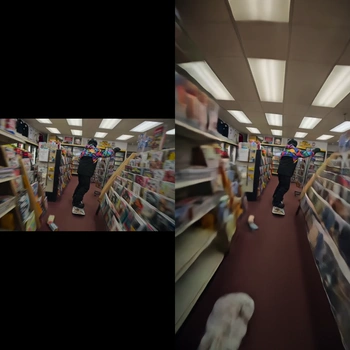
This ComfyUI workflow expands the boundaries of an existing video clip using LTX-2.3 with a dedicated Video Outpainting IC LoRA. It decodes your source video with VHS_LoadVideo, feeds frames into the core LTX-2.3 generation node (the custom node with ID 2e37ecc9-770a-4ac2-972c-e953901f49d3) where the LoRA guides the model to synthesize plausible content beyond the original edges, and then stitches the processed frames back into a video with VHS_VideoCombine. A MarkdownNote in the graph provides quick, in-context guidance.
Technically, the LoRA biases the base LTX-2.3 video diffusion model toward temporal, context-aware extrapolation. Controls like skip_first_frames and frame_count let you trim a long clip and iterate quickly on a representative segment before running the full range. Outpainting direction and amount are set on the LTX processing node (per-side expansion), while LoRA strength determines how assertively new content is invented versus preserved from the original. The result is a coherent, time-consistent extension of your scene—useful for reframing, adding headroom/side room, or conforming videos to new aspect ratios without obvious borders.
API
このワークフローをコードから利用
すべてのComfyワークフローはJSONグラフです。以下のペイロードは、このワークフローそのものであり、ComfyUIが実行する内容と同じです — このURLから取得し、バージョン管理に保存したり、ComfyUIで読み込んでノードごとに実行できます。
Comfy SDKを使ってTypeScriptまたはPythonから実行できます。同じコードでComfy Cloudや自身でホストしたComfyUIのどちらにも対応 — ベースURLだけが異なります。
// Install (beta)
npm i @comfyorg/sdk

// Run this workflow (TypeScript)
import { Comfy } from "@comfyorg/sdk";

const client = new Comfy({ apiKey: "comfyui-..." });
const wf = await client.workflows.fromFile("workflow_api.json");
const job = await client.run(wf);
await job.getOutputs("<output-node-id>")[0].toFile("output.png");
SDKはAPI形式のワークフローを受け取ります:このワークフローをComfyUIで開き、「ファイル → ワークフローをエクスポート(API)」を使用してください。



















