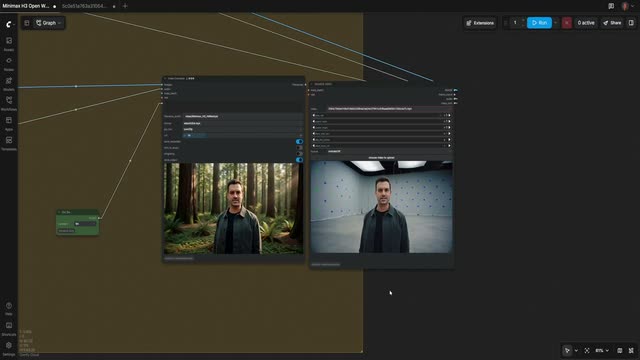
This workflow restyles an existing video using the open-weights MiniMax H3 model, guided by a reference “key art” image or a character image. In key art mode, it transfers background, palette, and lighting while preserving the performance; in character swap mode, it targets the subject’s appearance for a full identity change. The core is the MiniMaxH3ReferenceToVideo node, driven by UNETLoader (MiniMax H3), CLIPLoader (text conditioning), RandomNoise, and a sampler chain built from KSamplerSelect, BasicScheduler, SamplerCustomAdvanced, and BasicGuider. VAELoader and VAEDecode convert generated latents back to frames, and ImageFromBatch lets you QC results mid-run.
ResolutionSelector and VHS_VideoInfo handle the practicalities—frame size, fps, and clip duration (the clip length parameter expects whole seconds). SetNode/GetNode are used as convenient toggles and parameter routers, including the mode switch between key art swap and character swap. LoadImage supplies your guiding key art or character reference, while OpenRouterLLMNode (in the GENERATE PROMPT group) can help draft a shot-specific prompt that CLIPLoader uses for text conditioning. A VOICE OPTIONS branch can keep your original audio or pass it to a voice-replacement path; VAEDecodeAudio decodes the final audio stream for muxing with the new visuals.
The result is a VFX-friendly process for look development and restyling: keep the motion and timing of your source while re-lighting the scene, shifting color mood, replacing backgrounds, or swapping a character—useful for previz, mood boards, and quick creative iterations.
API
Use this workflow from code
Every Comfy workflow is a JSON graph. The payload below is this workflow, exactly as ComfyUI runs it — fetch it from the URL, keep it in version control, or load it in ComfyUI and run it node by node.
Run it from TypeScript or Python with the Comfy SDK. The same code targets Comfy Cloud or a ComfyUI you host yourself — only the base URL changes.
// Install (beta)
npm i @comfyorg/sdk

// Run this workflow (TypeScript)
import { Comfy } from "@comfyorg/sdk";

const client = new Comfy({ apiKey: "comfyui-..." });
const wf = await client.workflows.fromFile("workflow_api.json");
const job = await client.run(wf);
await job.getOutputs("<output-node-id>")[0].toFile("output.png");
The SDK takes a workflow in API format: open this workflow in ComfyUI and use File → Export Workflow (API).
Comfy Cloud API access requires a plan with an API key.
FAQ


















