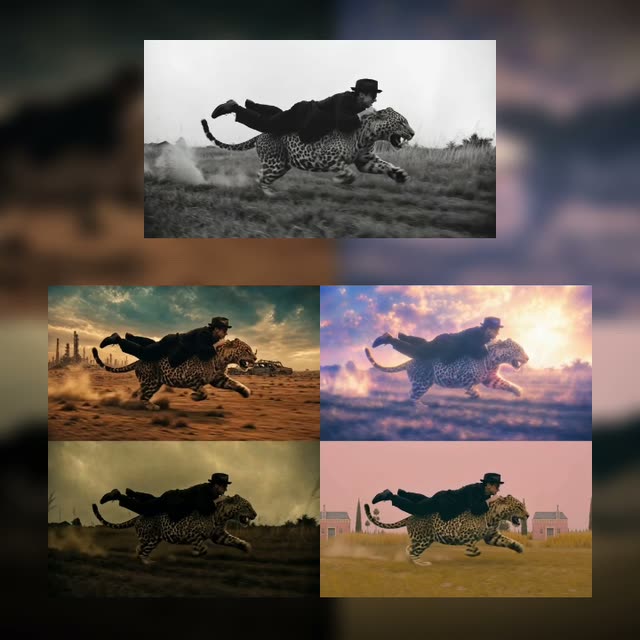
This depth-aware, reference-guided video-to-video workflow applies consistent style transfer to your footage while preserving motion and scene geometry. It starts by ingesting your clip with LoadVideo, then computes a per-frame depth map to anchor structure and camera movement (handled by the custom processing node c3b10638-32f0-4101-9b21-21fcda8712d8). The very first frame is extracted and saved (via SaveImage and helper utilities like 8dbec705-cae4-4197-9594-85b48cc18483), then passed to OpenAIGPTImageNodeV2 together with your text prompt from PrimitiveStringMultiline. GPT-Image-2 generates a style-matched reference image from that initial frame, which the workflow uses to steer the overall look.
The core stylization is driven by Seedance 2.0 through ByteDance2ReferenceNode, which fuses three signals: the depth map (structure), the first-frame style reference (appearance), and your prompt (semantic guidance). You can queue up to four style variations in one run using the batch fan-out/collector nodes (a3edb32a-4533-45e3-8eb2-84399225da2e), then reassemble the generated frames into final videos with CreateVideo and SaveVideo. The result is a set of stable, on-style clips that maintain the original timing and motion while reflecting your chosen aesthetic.
API
코드에서 이 워크플로우 사용하기
모든 Comfy 워크플로우는 JSON 그래프입니다. 아래 페이로드는 이 워크플로우 그 자체로, ComfyUI에서 실행되는 것과 동일합니다 — URL에서 가져오거나, 버전 관리에 보관하거나, ComfyUI에서 불러와 노드별로 실행할 수 있습니다.
Comfy SDK로 TypeScript 또는 Python에서 실행하세요. 동일한 코드는 Comfy Cloud 또는 직접 호스팅하는 ComfyUI 모두에 적용됩니다 — 기본 URL만 다릅니다.
// Install (beta)
npm i @comfyorg/sdk

// Run this workflow (TypeScript)
import { Comfy } from "@comfyorg/sdk";

const client = new Comfy({ apiKey: "comfyui-..." });
const wf = await client.workflows.fromFile("workflow_api.json");
const job = await client.run(wf);
await job.getOutputs("<output-node-id>")[0].toFile("output.png");
SDK는 API 형식의 워크플로우를 사용합니다: 이 워크플로우를 ComfyUI에서 열고 파일 → 워크플로우 내보내기(API)를 사용하세요.
FAQ


















