
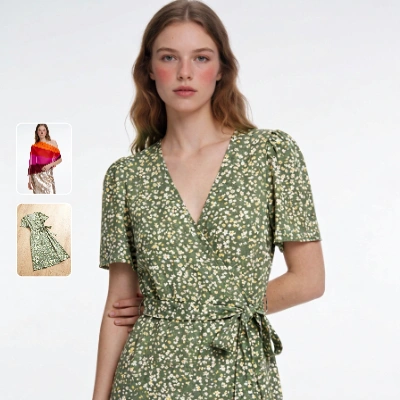
This workflow compares how different garment image types—flat-lay, mannequin, and on-model—perform in a virtual try-on using the Kling model. Two LoadImage nodes bring in a person photo and a garment image; the KlingTryOnNode then generates a realistic try-on while preserving the subject’s face and pose. The ImageCompare node assembles a side-by-side view of the original person photo and the generated try-on so you can visually judge fit alignment, drape plausibility, color/pattern fidelity, and identity preservation. SaveImageAdvanced stores both the try-on and the comparison output, and a MarkdownNote provides in-graph guidance.
To make this a fair comparison, keep the same person image while swapping the garment source across flat-lay, mannequin, and on-model product shots. Normalize garment framing and scale before each run so the KlingTryOnNode sees similar inputs. Expect trade-offs: flat-lay images are clean and easy to segment but offer fewer 3D cues; mannequin shots add structure without pose conflict; on-model shots carry natural drape cues but may introduce pose/shadow mismatches. The side-by-side ImageCompare output helps you quantify which input style yields the fewest artifacts for your catalog or campaign.
API
Use este workflow a partir do código
Todo workflow Comfy é um grafo JSON. O payload abaixo é este workflow, exatamente como o ComfyUI executa — obtenha-o pela URL, mantenha-o no controle de versão ou carregue-o no ComfyUI e execute nó por nó.
Execute a partir de TypeScript ou Python com o Comfy SDK. O mesmo código serve para o Comfy Cloud ou um ComfyUI hospedado por você — apenas a URL base muda.
// Install (beta)
npm i @comfyorg/sdk

// Run this workflow (TypeScript)
import { Comfy } from "@comfyorg/sdk";

const client = new Comfy({ apiKey: "comfyui-..." });
const wf = await client.workflows.fromFile("workflow_api.json");
const job = await client.run(wf);
await job.getOutputs("<output-node-id>")[0].toFile("output.png");
O SDK utiliza um workflow no formato API: abra este workflow no ComfyUI e use Arquivo → Exportar Workflow (API).
O acesso à API do Comfy Cloud requer um plano com chave de API.



















