Use Cases
AI Interior Design Workflows
Restyle a real room from a photo and keep its walls, windows, and dimensions intact using open, editable ComfyUI ControlNet workflows.
3 workflows

The workflows
3 AI Interior Design Workflows

About This Workflow
What is the AI Interior Design?
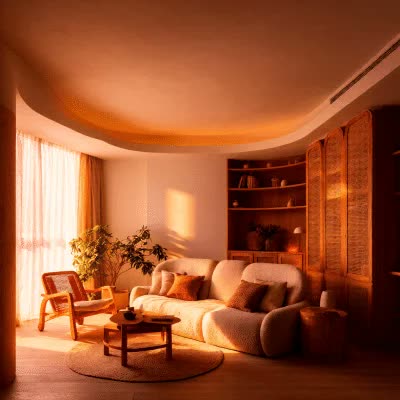
The first thing people ask of any ai interior design tool is whether it keeps the actual room or invents a fantasy one. Most consumer apps generate a brand-new picture loosely inspired by your photo, so the windows move, a wall disappears, and the proportions stop matching the space you are actually trying to renovate. The ComfyUI workflows on this page take a different route. They use ControlNet to read the depth and edges of your photo first, then redesign on top of that geometry, so the restyled room shares the same layout you started with.
That is the difference between a pretty render and a useful one. A depth ControlNet captures how far each surface sits from the camera, while a canny ControlNet traces the hard edges of walls, doorways, and furniture outlines. When you redesign a room from a photo with either map driving the generation, models like Flux, SD3.5, Qwen-Image, and Z-Image-Turbo repaint materials, lighting, and furnishings while the structure stays locked to the original. The result reads as the same room with a new look, not a different room entirely.
You control how literal that fidelity is. ControlNet exposes a strength setting: keep it high and the redesign hugs every edge of the existing space, which is what you want for remodel visualization where the client needs to recognize their own living room. Lower it and the model gets more creative latitude to reinterpret the layout, which suits early mood-boarding when you are still exploring directions. Being able to slide between faithful and exploratory on the same photo is something fixed one-click tools rarely allow.
The cluster covers the three jobs interior work actually involves. Whole-room restyling repaints an entire space into a chosen aesthetic from one reference photo. Layout-preserving redesign through depth or canny ControlNet, including the Qwen InstantX ControlNet workflow, holds the geometry steady while swapping the style. Targeted edits with Qwen-Image-Edit change only one thing, the flooring, a wall color, or a single piece of furniture, instead of regenerating everything, so you can iterate on details without losing the parts that already worked.
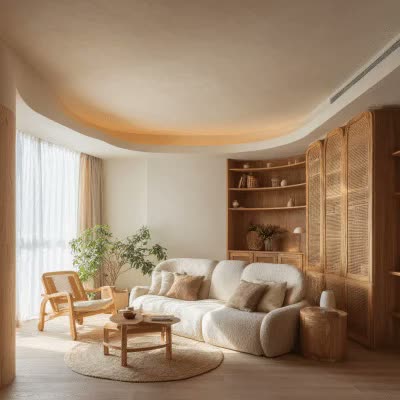
Virtual staging is one of the strongest uses here. Real-estate listings sell faster when rooms look furnished and current, and these workflows let you stage an empty or dated room straight from an MLS photo, then export a clean image for the listing. Because the layout is preserved, the staged photo still represents the real property rather than misleading buyers with a space that does not exist. You can run the same input through several interior design styles, modern, Scandinavian, minimalist, Japandi, mid-century, or industrial, to show one room multiple ways.
Everything runs from open, editable workflows, locally in ComfyUI or on Comfy Cloud with no install. There is no watermark stamped across the export and no cap on how many rooms you process. Treat the stack as an ai room planner you fully own: adjust the ControlNet strength, swap the underlying model to match your photo, and re-run any step until the redesign matches the space and the look you had in mind.

Reproducible, tunable, yours
Every step is exposed and adjustable, and the exact graph is yours to reuse across projects.
Start free. Upgrade when you’re ready.
Capabilities
What You Can Create
Restyle whole rooms, preserve real layouts, and make targeted edits, all from open, editable ComfyUI ControlNet workflows.
Targeted item edits
Change only the flooring, a wall color, or one furniture piece with Qwen-Image-Edit instead of regenerating the whole room.
Try workflow

Virtual staging
Furnish an empty or dated room from an MLS photo for a real-estate listing while keeping the property's true layout.
Try workflow

Multi-style exploration
Run one photo through modern, Scandinavian, minimalist, Japandi, mid-century, and industrial looks to compare directions.
Try workflow


 WORKS
WORKS
Connect models, processing steps, and outputs on a canvas where every decision is visible and every step is inspectable.
Start from a community template or build from scratch.

Comparison
Why Comfy Workflows
-
Lock the room, change everything else
Depth and line ControlNet preserve walls, windows, and proportions while you restyle the whole room.
-
Pick your variant and settings
ONLY ONComfyCLOUDSwap between Flux, Qwen-Image, SD3.5, and Z-Image-Turbo, then dial fidelity up or down to suit each photo.
-
More control than any one-click tool
Every node is exposed and every setting adjustable, so you get production-quality rooms instead of lucky guesses.
-
No watermarks, full resolution
The distilled Z-Image-Turbo iterates fast, and the images you generate ship with no watermark.
Applications
What people use it for
Real jobs designers, agents, and homeowners run these room workflows for.



Frequently Asked Questions
AI Interior Design FAQ
Keep exploring
Related models and use cases to try next.