去背景: RMBG 3.0
RMBG 3.0 生成柔和的灰度 alpha matte 而非硬 mask,头发、玻璃、头纱与液体能保留真实透明。由视觉模型读图自动写抠图指令,补一句材质说明还能继续微调。
下载工作流在 Cloud 中试用 API 文档
简介
RMBG 3.0 renders a soft grayscale alpha matte instead of a hard mask, so hair, glass, veils and liquid keep real transparency. A vision model writes the matting instruction from your image; add one sentence about the material to refine it.
Graph: 71614996-81e0-4af2-8540-a63693a3169f, ImageCompare, LoadImage, MarkdownNote, MaskPreview, SaveImage. Output: image (utility_rmbg3_remove_background.png).
你需要提供
- 正在读取工作流
在 ComfyUI 中运行。 此工作流无法在本页面运行。请下载后在 ComfyUI 中打开。
下载工作流示例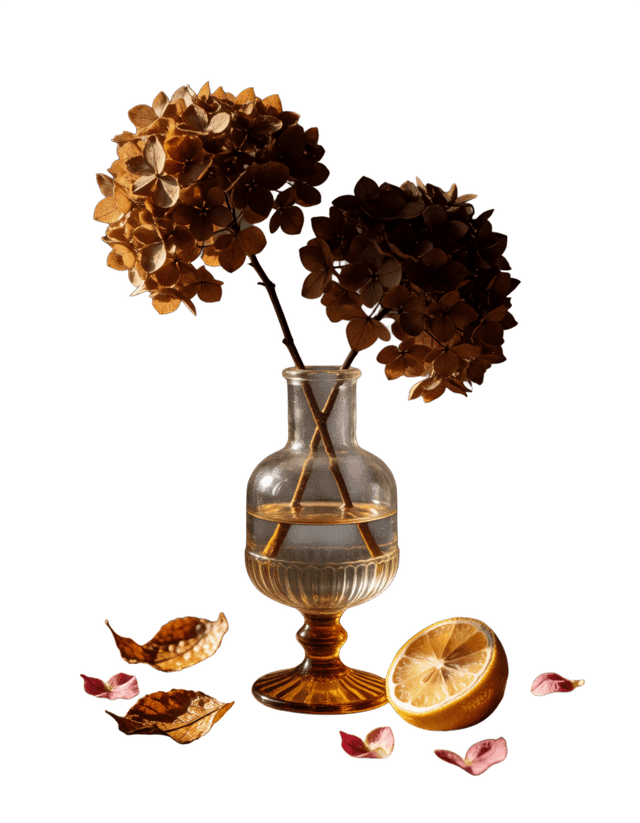
查看工作流内部
节点图的只读预览。在 Comfy Cloud 中打开或下载后即可编辑节点。
Loading the graph
Open full-size workflow preview此工作流中的文件
- 输出
- 图像
- 作者
- 作者信息暂不可用
需要自定义节点
- 正在读取工作流
通过代码使用此工作流
尽可能根据工作流图和输入自动生成代码,否则显示已保存的示例。运行代码可能产生费用,请先核对凭据和端点。
1 获取 API 密钥 ↗
What you need
- Runs on
- Comfy Cloud
- 密钥
- COMFY_API_KEY
需要付费的 Cloud 方案和额度。
下载 API JSONAPI 文档 ↗
# Python 3.10+: pip install comfy-sdk==0.4.0
import os

from comfy_sdk import Comfy

api_key = os.environ.get("COMFY_API_KEY", "").strip()
if not api_key: raise RuntimeError("Set COMFY_API_KEY")
os.environ.setdefault("COMFY_BASE_URL", "https://cloud.comfy.org")
client = Comfy(api_key=api_key)
workflow = client.workflows.from_json({
    "10": {
        "class_type": "LoadImage",
        "inputs": {
            "image": "withered_hydrangeas_still_life_vintage_lit.png"
        },
        "_meta": {
            "title": "Load Image (source)"
        }
    },
    "24": {
        "class_type": "ImageCompare",
        "inputs": {
            "compare_view": None,
            "image_a": [
                "10",
                0
            ],
            "image_b": [
                "146:34",
                0
            ]
        },
        "_meta": {
            "title": "Compare Images"
        }
    },
    "168": {
        "class_type": "MaskPreview",
        "inputs": {
            "mask": [
                "146:163",
                0
            ]
        },
        "_meta": {
            "title": "Preview Mask"
        }
    },
    "170": {
        "class_type": "SaveImage",
        "inputs": {
            "filename_prefix": "rmbg3/background",
            "images": [
                "146:147",
                0
            ]
        },
        "_meta": {
            "title": "SaveImage"
        }
    },
    "171": {
        "class_type": "SaveImage",
        "inputs": {
            "filename_prefix": "rmbg3/foreground",
            "images": [
                "146:34",
                0
            ]
        },
        "_meta": {
            "title": "SaveImage"
        }
    },
    "146:1": {
        "class_type": "UNETLoader",
        "inputs": {
            "unet_name": "rmbg3_int8_convrot.safetensors",
            "weight_dtype": "default"
        },
        "_meta": {
            "title": "Load Diffusion Model"
        }
    },
    "146:147": {
        "class_type": "JoinImageWithAlpha",
        "inputs": {
            "alpha": [
                "146:148",
                0
            ],
            "image": [
                "10",
                0
            ]
        },
        "_meta": {
            "title": "Join Image with Alpha"
        }
    },
    "146:148": {
        "class_type": "GrowMask",
        "inputs": {
            "expand": 0,
            "mask": [
                "146:163",
                0
            ],
            "tapered_corners": True
        },
        "_meta": {
            "title": "Grow Mask"
        }
    },
    "146:156": {
        "class_type": "CLIPLoader",
        "inputs": {
            "clip_name": "qwen3vl_4b_int8_convrot.safetensors",
            "device": "default",
            "type": "stable_diffusion"
        },
        "_meta": {
            "title": "Load CLIP"
        }
    },
    "146:157": {
        "class_type": "PrimitiveStringMultiline",
        "inputs": {
            "value": "You are the prompt writer for an image matting model (RMBG 3.0). You receive a photo and, optionally, a short note from the user about what the subject is or what material it is made of.\n\nAlways answer with ONE paragraph (max 90 words) that instructs the image model to render a grayscale transparency map of the main subject:\n- pure black background;\n- near-white for every opaque part of the subject, naming them as they appear in this image;\n- middle gray for see-through parts (glass, tulle, sheer fabric, liquid, smoke, mesh), dark gray only for the thinnest of them;\n- the entire subject must stay present and opaque parts must not be turned transparent;\n- keep continuous gray gradients inside the shape, and exclude the backdrop and any reflection or shadow on the ground.\n\nRules that override any other reading:\n- A part the note calls transparent, translucent or glass maps to middle gray (dark gray where it is thinnest) - NEVER to near-white.\n- Colour never implies opacity: coloured glass, coloured liquid and coloured mesh are still see-through and get gray, never white.\n- Only parts that are solid in the note and in the photo (skin, fabric, petals, stems, metal, wood) get near-white.\n\nIf the note is empty, decide the opaque / see-through split from the image alone. If the note names a material or what the thing is, treat it as authoritative and let it override what you would otherwise guess.\n\nReply with the instruction only."
        },
        "_meta": {
            "title": "Text (System Prompt)"
        }
    },
    "146:158": {
        "class_type": "TextGenerateV2",
        "inputs": {
            "clip": [
                "146:156",
                0
            ],
            "images.image1": [
                "10",
                0
            ],
            "max_length": 512,
            "mtp": "auto",
            "prompt": [
                "146:178",
                0
            ],
            "sampling_mode": "on",
            "sampling_mode.min_p": 0.05,
            "sampling_mode.presence_penalty": 0,
            "sampling_mode.repetition_penalty": 1.05,
            "sampling_mode.seed": 0,
            "sampling_mode.temperature": 0.7,
            "sampling_mode.top_k": 64,
            "sampling_mode.top_p": 0.95,
            "system_prompt": [
                "146:157",
                0
            ],
            "thinking": True,
            "use_default_template": True
        },
        "_meta": {
            "title": "Generate Text"
        }
    },
    "146:159": {
        "class_type": "ComfySwitchNode",
        "inputs": {
            "on_false": [
                "146:177",
                0
            ],
            "on_true": [
                "146:158",
                0
            ],
            "switch": False
        },
        "_meta": {
            "title": "If/Else Switch"
        }
    },
    "146:160": {
        "class_type": "AdjustBrightness",
        "inputs": {
            "factor": 1,
            "images": [
                "146:6",
                0
            ]
        },
        "_meta": {
            "title": "Adjust Brightness"
        }
    },
    "146:161": {
        "class_type": "AdjustContrast",
        "inputs": {
            "factor": 1,
            "images": [
                "146:160",
                0
            ]
        },
        "_meta": {
            "title": "Adjust Contrast"
        }
    },
    "146:162": {
        "class_type": "ThresholdMask",
        "inputs": {
            "mask": [
                "146:35",
                0
            ],
            "value": 0.8500000000000001
        },
        "_meta": {
            "title": "Threshold Mask"
        }
    },
    "146:163": {
        "class_type": "ComfySwitchNode",
        "inputs": {
            "on_false": [
                "146:35",
                0
            ],
            "on_true": [
                "146:162",
                0
            ],
            "switch": False
        },
        "_meta": {
            "title": "If/Else Switch"
        }
    },
    "146:164": {
        "class_type": "PreviewAny",
        "inputs": {
            "source": [
                "146:159",
                0
            ]
        },
        "_meta": {
            "title": "Preview as Text"
        }
    },
    "146:177": {
        "class_type": "PrimitiveStringMultiline",
        "inputs": {
            "value": "{\"edit_instruction\": \"Generate a detailed grayscale alpha matte. Map the opaque foreground to white and the background to black. Produce soft, anti-aliased grayscale gradients at the edges of the subject to represent fine details and transparency.\"}"
        },
        "_meta": {
            "title": "Text (Preset Instruction)"
        }
    },
    "146:178": {
        "class_type": "StringFormat",
        "inputs": {
            "f_string": "Write the matte instruction for this image.\n\nUser note about the subject (authoritative when present, may be empty): {a}",
            "values.a": [
                "146:179",
                0
            ]
        },
        "_meta": {
            "title": "Format Text"
        }
    },
    "146:179": {
        "class_type": "PrimitiveStringMultiline",
        "inputs": {
            "value": ""
        },
        "_meta": {
            "title": "Text ( (User guide))"
        }
    },
    "146:2": {
        "class_type": "CLIPLoader",
        "inputs": {
            "clip_name": "qwen3vl_4b_int8_convrot.safetensors",
            "device": "default",
            "type": "fibo2"
        },
        "_meta": {
            "title": "Load CLIP"
        }
    },
    "146:3": {
        "class_type": "VAELoader",
        "inputs": {
            "vae_name": "flux2-vae.safetensors"
        },
        "_meta": {
            "title": "Load VAE"
        }
    },
    "146:34": {
        "class_type": "JoinImageWithAlpha",
        "inputs": {
            "alpha": [
                "146:36",
                0
            ],
            "image": [
                "10",
                0
            ]
        },
        "_meta": {
            "title": "Join Image with Alpha"
        }
    },
    "146:35": {
        "class_type": "ImageToMask",
        "inputs": {
            "channel": "red",
            "image": [
                "146:161",
                0
            ]
        },
        "_meta": {
            "title": "Convert Image to Mask"
        }
    },
    "146:36": {
        "class_type": "InvertMask",
        "inputs": {
            "mask": [
                "146:148",
                0
            ]
        },
        "_meta": {
            "title": "Invert Mask"
        }
    },
    "146:4": {
        "class_type": "TextEncodeFibo2",
        "inputs": {
            "batch_size": 1,
            "clip": [
                "146:2",
                0
            ],
            "height": 0,
            "images.image_1": [
                "10",
                0
            ],
            "negative_prompt": "",
            "prompt": [
                "146:164",
                0
            ],
            "vae": [
                "146:3",
                0
            ],
            "width": 0
        },
        "_meta": {
            "title": "TextEncodeFibo2"
        }
    },
    "146:5": {
        "class_type": "KSampler",
        "inputs": {
            "cfg": 1,
            "denoise": 1,
            "latent_image": [
                "146:4",
                2
            ],
            "model": [
                "146:1",
                0
            ],
            "negative": [
                "146:4",
                1
            ],
            "positive": [
                "146:4",
                0
            ],
            "sampler_name": "euler",
            "scheduler": "simple",
            "seed": 42,
            "steps": 4
        },
        "_meta": {
            "title": "KSampler"
        }
    },
    "146:6": {
        "class_type": "VAEDecode",
        "inputs": {
            "samples": [
                "146:5",
                0
            ],
            "vae": [
                "146:3",
                0
            ]
        },
        "_meta": {
            "title": "VAEDecode"
        }
    }
})

# run() also passes api_key to the partner nodes in this workflow.
job = client.run(workflow, api_key=api_key)