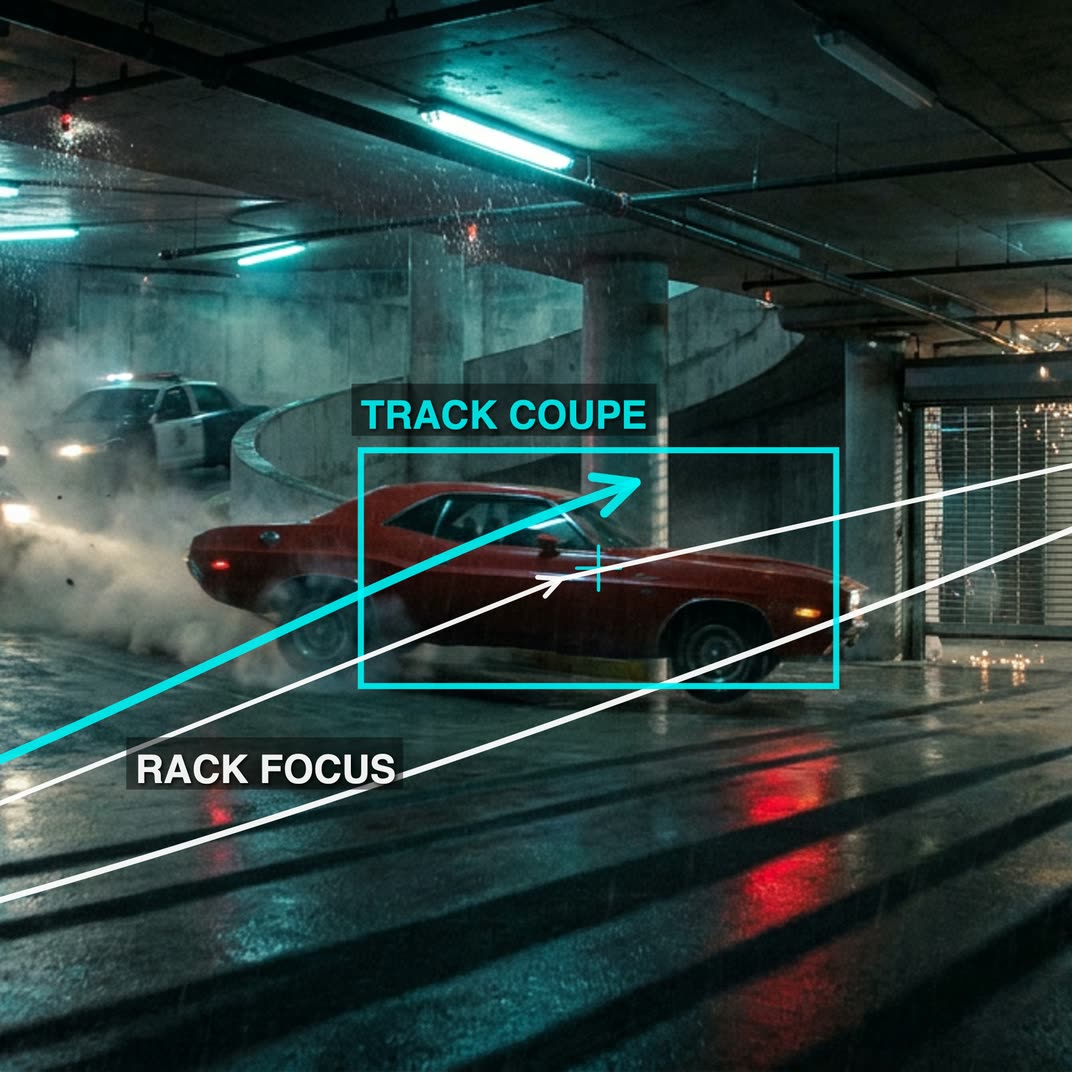
cinematic_annotate_video

cinematic_annotate_video turns a single clean image into a short, smooth, cinematic shot by auto-writing a director-style camera path and translating it into a Seedance 2.0 motion prompt. The workflow starts with LoadImage and passes your frame into GeminiImage2Node, which analyzes the scene and generates camera-path markup using the "Nano Banana 2" annotation style. That markup is then refined/formatted by GeminiNode into a Seedance 2.0 motion specification.

The Seedance 2.0 prompt and your original image are fed into ByteDance2ReferenceNode to synthesize the motion while preserving the look of the source frame. PreviewImage and PreviewAny help you inspect the input frame and the auto-generated text prompts before you commit to a render. Finally, SaveVideo writes the result to disk. Groups are organized for clarity: Annotate Image (image analysis and camera notes), Prompt (LLM formatting to Seedance 2.0), and Seedance 2.0 (reference-driven video generation).

FAQ

常見問題

查看所有工作流

Seedance 2.0: Reference to Video

ByteDance
ComfyUIComfyUI
Partner Nodes
Image to Video
Video
Nano Banana 2 Lite: Text to Image

Nano Banana 2 Lite: Text to Image

Nano Banana 2
ComfyUIComfyUI
Partner Nodes
Text to Image
Seedream 5.0 Pro: Image Edit - After
Seedream 5.0 Pro: Image Edit - Before

Seedream 5.0 Pro: Image Edit

ComfyUIComfyUI
Partner Nodes
Image Edit
Krea-2: Text to Image

Krea-2: Text to Image

ComfyUIComfyUI
Text to Image

4K Seedance 2.0 - Reference to Video

Seedance 2.0
PurzPurz
Character
Cinematic
Image to Video
Lip Sync
Multiple Angles
Portrait
Style Reference
Style Transfer
Text to Video
Video Generation
Video
Z-Image-Turbo Text to Image

Z-Image-Turbo Text to Image

ComfyUIComfyUI
Image
Text to Image
Grok: Image Edit - After
Grok: Image Edit - Before

Grok: Image Edit

ComfyUIComfyUI
Partner Nodes
Image Edit
Nano Banana 2 Lite: Image Edit - After
Nano Banana 2 Lite: Image Edit - Before

Nano Banana 2 Lite: Image Edit

ComfyUIComfyUI
Partner Nodes
Image Edit

Grok: Video generation

Grok
ComfyUIComfyUI
Video
Image to Video
Text to Video
Partner Nodes

Seedance2.0 4K: Reference to Video

ComfyUIComfyUI
Partner Nodes
Image to Video
Grok Imagine Image Quality: Generation

Grok Imagine Image Quality: Generation

ComfyUIComfyUI
Text to Image
Partner Nodes

LTX 2.3 - Lipdub LoRA + Voice Clone

RobRob
Audio Editing
Character
Video Edit
Video to Video
Voice Cloning
Text to Audio

1 image input Split Stack - Qwen Multiangle + Wan 2.2

Wan2.2
RobRob
Video

Seedance 2.0 Mini: Reference to Video

ComfyUIComfyUI
Partner Nodes
Image to Video

SCAIL-2: Character Replacement

ComfyUIComfyUI
Video Edit
Ideogram v4: Text to Image

Ideogram v4: Text to Image

ComfyUIComfyUI
Text to Image

Googly Eyes

LTX-2.3
PurzPurz
Video to Video
Video
Video Edit
LoRA

Seedance 2.0 - Viral Videos Character Swap

RobRob
Character Reference
Image to Video
Video to Video
Video Generation
Text Generation

Seedance 2.0 Reference to Video - Concept Art + Stop Motion Style

Seedance 2.0
MintaMinta
Video

Gemini Omni Flash: Image to Video

ComfyUIComfyUI
Image to Video
Nano Banana 2: Image Edit

Nano Banana 2: Image Edit

Google
ComfyUIComfyUI
Partner Nodes
Image Edit

HappyHorse 1.1: Text to Video

ComfyUIComfyUI
Partner Nodes
Text to Video
Video

HappyHorse 1.1: Image to Video

ComfyUIComfyUI
Image to Video
Video
Partner Nodes

Beeble SwitchX: Video Edit

ComfyUIComfyUI
Image Edit
3x3 Contact Sheet

3x3 Contact Sheet

enigmatic_eenigmatic_e
Image

Restore Archival Footage - LTX 2.3 Dearchive LoRA

RobRob
Video Edit
Video
Video Generation
Video to Video
Seedream 5.0 Pro: Text to Image

Seedream 5.0 Pro: Text to Image

ComfyUIComfyUI
Text to Image
Partner Nodes

Gemini Omni Flash: Text to Video

ComfyUIComfyUI
Partner Nodes
Text to Video

Remove Object from Video - LTX 2.3 Obscura Remova LoRA

RobRob
Video Edit
Video
Video to Video

Stylize Video - Frame by Frame - Flux.2 Klein 4b

RobRob
Video Edit
Video to Video
Image Edit
Showing 30 of 563 templates


















