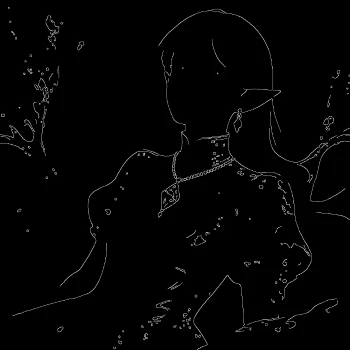

The Qwen-Image Union Control workflow is designed to provide users with precise structural control over image generation using the Qwen-Image model's unified ControlNet LoRA. This workflow integrates multiple control types, such as canny, depth, lineart, softedge, normal, and openpose, allowing for a wide range of creative applications. By leveraging these controls, users can guide the image generation process to produce results that closely match their artistic vision or project requirements.
Technically, this workflow utilizes a series of nodes to process and refine images. The 'LoadImage' node initializes the process by importing the reference image. The 'Canny' node is employed to detect edges, providing a structural outline that guides the image generation. The 'ImageScaleToTotalPixels' node ensures that the input image is resized appropriately to avoid poor output results. The 'PreviewImage' node allows users to visualize the intermediate results, while the 'SaveImage' node finalizes the process by saving the generated image. This workflow is particularly useful for artists and designers who require a high degree of control over the structural aspects of their images.
API
Use this workflow from code
Every Comfy workflow is a JSON graph. The payload below is this workflow, exactly as ComfyUI runs it — fetch it from the URL, keep it in version control, or load it in ComfyUI and run it node by node.
Run it from TypeScript or Python with the Comfy SDK. The same code targets Comfy Cloud or a ComfyUI you host yourself — only the base URL changes.
// Install (beta)
npm i @comfyorg/sdk

// Run "Qwen-Image Union Control" (TypeScript)
import { Comfy } from "@comfyorg/sdk";

const client = new Comfy({ apiKey: "comfyui-..." });

// This workflow, exported in API format (see note below)
const wf = await client.workflows.fromFile("image_qwen_image_union_control_lora_api.json");

const asset = client.assets.fromFile("input.png");
wf.setInput("73", "image", asset);  // LoadImage

const job = await client.run(wf);
await job.getOutputs("60")[0].toFile("output.png");  // SaveImage
The SDK takes a workflow in API format: open this workflow in ComfyUI and use File → Export Workflow (API).
Comfy Cloud API access requires a plan with an API key.
FAQ


















