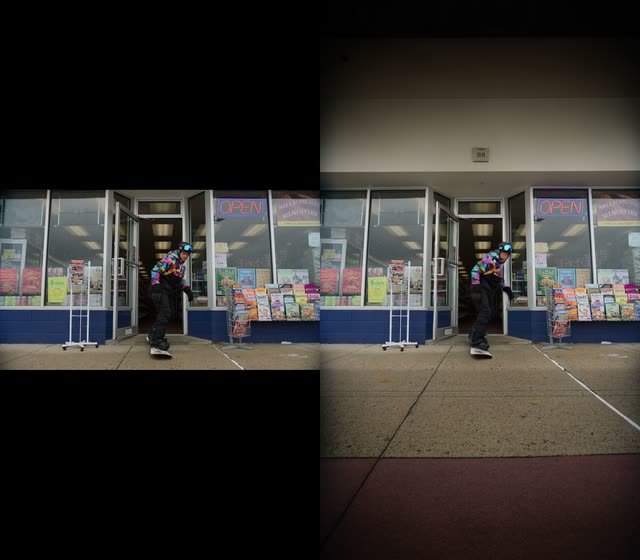
這個 ComfyUI 工作流程用於影片外延(outpainting):會擴展片段中每一幀的畫布,並在原始畫面周圍合成可信的新內容。它透過 VHS_LoadVideo 載入來源影片,使用一個設定為採用 LTX 2.3 Video Outpainting IC LoRA 的自訂外延處理器來處理影格,最後用 VHS_VideoCombine 將影格重新組裝成完成的影片。圖形中也提供 MarkdownNote 作為內嵌指引。
在技術上,核心外延步驟(自訂節點 ID:2e37ecc9-770a-4ac2-972c-e953901f49d3)會依你選擇的方向為影格加上邊界,並在新增區域進行局部修補,同時保留原始內容。LTX 2.3 Video Outpainting IC LoRA 會為擴散流程提供條件,使生成的邊緣在風格以及語意上能逐幀保持一致。此工作流程提供兩個關鍵時間軸控制:skip_first_frames(從開頭裁切的影格數)以及 frame_count(略過後要處理的影格數)。例如,在 600 幀的片段上,你可設定 skip_first_frames:60、frame_count:480,以處理第 60–539 幀。這讓你能先測試短片段,再渲染整支影片。
由於建立在 VHS 節點上,你可獲得穩定的影格擷取與重組,以及對幀率與輸出位置的直接控制。適用於需要把直式影片轉成寬螢幕、為重新取景增加上方空間/側邊留白,或延伸背景以符合新比例而避免明顯裁切的情境。
API
從程式碼使用此工作流
每個 Comfy 工作流都是一個 JSON 圖。下方的 payload 就是此工作流,與 ComfyUI 執行時完全相同 — 你可以從此 URL 取得、放入版本控制,或在 ComfyUI 載入並逐節點執行。
使用 Comfy SDK 以 TypeScript 或 Python 執行。相同程式碼可用於 Comfy Cloud 或你自架的 ComfyUI — 只需更改 base URL。
// Install (beta)
npm i @comfyorg/sdk

// Run this workflow (TypeScript)
import { Comfy } from "@comfyorg/sdk";

const client = new Comfy({ apiKey: "comfyui-..." });
const wf = await client.workflows.fromFile("workflow_api.json");
const job = await client.run(wf);
await job.getOutputs("<output-node-id>")[0].toFile("output.png");
SDK 需使用 API 格式的工作流:請在 ComfyUI 開啟此工作流,並使用 檔案 → 匯出工作流(API)。
常見問題


















