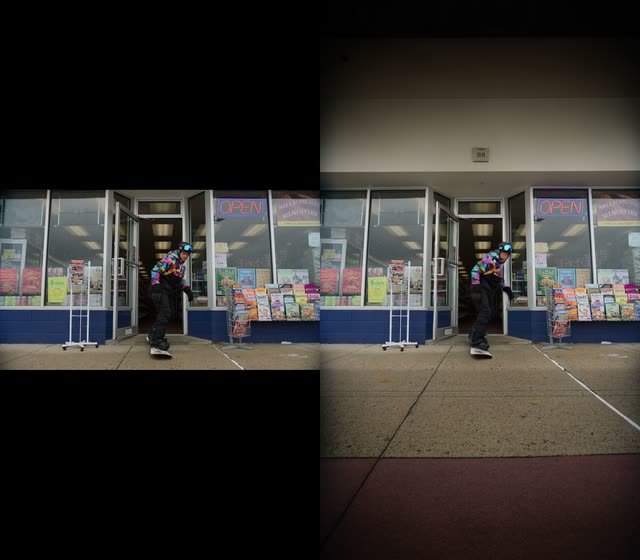
Ce workflow ComfyUI effectue de l’outpainting vidéo : il étend la toile de chaque image de votre clip et synthétise du contenu crédible autour des images d’origine. Il charge votre vidéo source avec VHS_LoadVideo, traite les images avec un processeur d’outpainting personnalisé configuré pour utiliser le modèle LTX 2.3 Video Outpainting IC LoRA, puis réassemble les images en une vidéo finale avec VHS_VideoCombine. Une MarkdownNote dans le graphe fournit des indications directement dans le workflow.
Techniquement, l’étape centrale d’outpainting (ID de nœud personnalisé : 2e37ecc9-770a-4ac2-972c-e953901f49d3) ajoute du padding à l’image dans la/les direction(s) choisie(s), puis inpaint les zones nouvellement ajoutées tout en préservant le contenu original. Le modèle LTX 2.3 Video Outpainting IC LoRA conditionne le processus de diffusion afin que les bords générés restent cohérents stylistiquement et sémantiquement d’une image à l’autre. Le workflow expose deux contrôles clés de timeline : skip_first_frames (images à ignorer au début) et frame_count (nombre d’images à traiter après le skip). Par exemple, sur un clip de 600 images, vous pouvez définir skip_first_frames: 60 et frame_count: 480 pour traiter les images 60–539. Cela facilite les tests sur de courts segments avant de rendre toute la vidéo.
Comme il est basé sur des nœuds VHS, vous bénéficiez d’une extraction et d’une recombinaison fiables des images, ainsi que d’un contrôle simple de la cadence d’images et de l’emplacement de sortie. À utiliser quand vous devez convertir une vidéo verticale en format paysage, ajouter de la marge en haut/latérale pour recadrer, ou étendre un arrière-plan pour de nouveaux formats sans recadrage visible.
API
Utiliser ce workflow depuis le code
Chaque workflow Comfy est un graphe JSON. Le contenu ci-dessous est ce workflow, exactement comme ComfyUI l’exécute — récupérez-le depuis l’URL, gardez-le dans le contrôle de version, ou chargez-le dans ComfyUI et exécutez-le nœud par nœud.
Exécutez-le depuis TypeScript ou Python avec le Comfy SDK. Le même code cible Comfy Cloud ou un ComfyUI auto-hébergé — seule l’URL de base change.
// Install (beta)
npm i @comfyorg/sdk

// Run this workflow (TypeScript)
import { Comfy } from "@comfyorg/sdk";

const client = new Comfy({ apiKey: "comfyui-..." });
const wf = await client.workflows.fromFile("workflow_api.json");
const job = await client.run(wf);
await job.getOutputs("<output-node-id>")[0].toFile("output.png");
Le SDK prend un workflow au format API : ouvrez ce workflow dans ComfyUI et utilisez Fichier → Exporter le workflow (API).
L’accès à l’API Comfy Cloud nécessite un forfait avec clé API.
FAQ


















