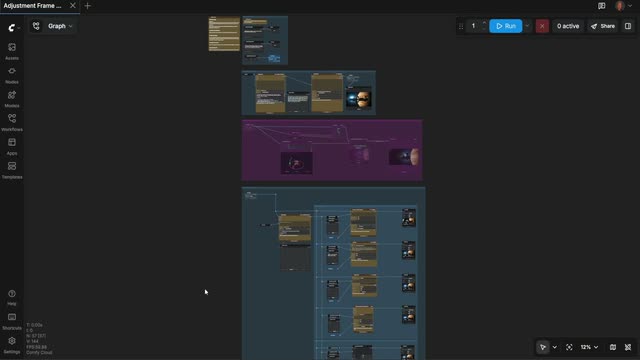
The Adjustment Frame Workflow is a director-style pipeline for turning a written shot idea into multiple polished video takes you can compare side-by-side. It stages your work like a real set: first you block the shot as a still, then you refine the camera, and finally you roll multiple takes across different model backends. A Text Multiline node captures your prompt (what the image is and the action you want), and the 1A) GENERATE SHOT STILL group produces a reference frame you can review with PreviewImage/PreviewAny before spending any credits.
Next, the 1B) CONTROL CAMERA ANGLE group routes your shot through QwenMultiangleCameraNode to generate camera-aware variations (e.g., wide vs. close-up, low vs. high angle, focal length cues). Utility nodes like RegexExtract and ComfyMathExpression help parse camera directions from your text and normalize values like duration, fps, or resolution. In 2) GENERATE VIDEO(S), you can send the approved composition to one or more API partners—GrokVideoNode, KlingVideoNode, and GeminiNode—optionally anchoring identity or style via ByteDance2ReferenceNode. Image Resize ensures each model receives a compatible resolution, PreviewAny lets you compare takes interactively, and SaveVideo writes out the best result. SetNode/GetNode pass key parameters between groups so your shot intent, camera notes, and timing remain consistent. This workflow is especially useful because you only “roll” once you like the frame and angle—preventing credit waste while getting clear, comparable outputs from top models.
API
코드에서 이 워크플로우 사용하기
모든 Comfy 워크플로우는 JSON 그래프입니다. 아래 페이로드는 이 워크플로우 그 자체로, ComfyUI에서 실행되는 것과 동일합니다 — URL에서 가져오거나, 버전 관리에 보관하거나, ComfyUI에서 불러와 노드별로 실행할 수 있습니다.
Comfy SDK로 TypeScript 또는 Python에서 실행하세요. 동일한 코드는 Comfy Cloud 또는 직접 호스팅하는 ComfyUI 모두에 적용됩니다 — 기본 URL만 다릅니다.
// Install (beta)
npm i @comfyorg/sdk

// Run this workflow (TypeScript)
import { Comfy } from "@comfyorg/sdk";

const client = new Comfy({ apiKey: "comfyui-..." });
const wf = await client.workflows.fromFile("workflow_api.json");
const job = await client.run(wf);
await job.getOutputs("<output-node-id>")[0].toFile("output.png");
SDK는 API 형식의 워크플로우를 사용합니다: 이 워크플로우를 ComfyUI에서 열고 파일 → 워크플로우 내보내기(API)를 사용하세요.
FAQ


















