產品合成重打光
上傳產品的合成圖像,在遮罩編輯器中繪製遮罩,然後將產品重新打光到場景中。
下載工作流程在 Cloud 中試用 API 文件
關於
ComfyUI 中的「Relight Composited Product」工作流程,設計用於強化產品圖片,讓使用者能調整合成影像中特定區域的光線。這對產品攝影師以及電商業者很實用,可製作更具辨識度的商品圖。此工作流程運用 Qwen-Image-Edit 模型(以進階影像編輯能力著稱)來達成更自然的打光調整。透過「comfyui-inpaint-cropandstitch」自訂節點,使用者可以精準鎖定需要補光的區域,並與原場景無縫融合。此工作流程可在不依賴複雜修圖軟體的情況下改善商品圖的視覺品質。
您提供的內容
- 正在讀取工作流程
在 ComfyUI 中執行。 此工作流程無法在此頁面上執行。請在已載入所有內容的 Comfy Cloud 中開啟,或下載到您自己的 ComfyUI。
在 Cloud 中試用範例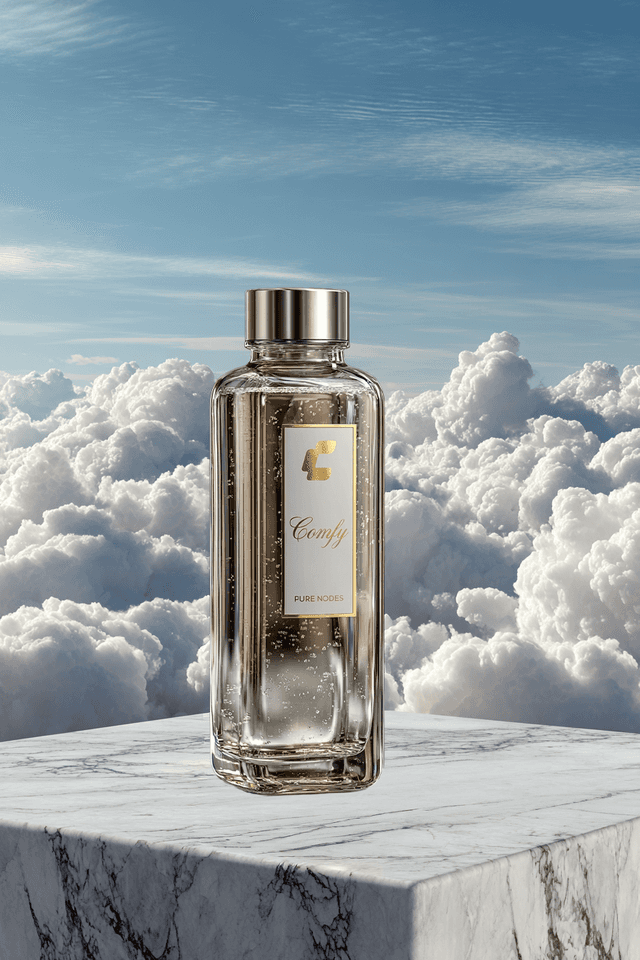
工作流程內部
節點圖的唯讀預覽。請在 Comfy Cloud 中開啟,或下載後編輯節點。
從程式碼使用此工作流程
可行時會根據工作流程圖和輸入內容產生;否則會顯示儲存的範例。執行可能產生費用的程式碼前,請檢查認證資訊和端點。
1 取得 API 金鑰 ↗
What you need
- Runs on
- Comfy Cloud
- 金鑰
- COMFY_API_KEY
需要付費 Cloud 方案與點數。
下載 API JSONAPI 文件 ↗
# Python 3.10+: pip install comfy-sdk==0.4.0
import os

from comfy_sdk import Comfy

api_key = os.environ.get("COMFY_API_KEY", "").strip()
if not api_key: raise RuntimeError("Set COMFY_API_KEY")
os.environ.setdefault("COMFY_BASE_URL", "https://cloud.comfy.org")
client = Comfy(api_key=api_key)
workflow = client.workflows.from_json({
    "103": {
        "class_type": "LoadImage",
        "inputs": {
            "image": "comfy_cloud_bottle.png"
        },
        "_meta": {
            "title": "Load Image + Draw Square Mask"
        }
    },
    "208": {
        "class_type": "SaveImage",
        "inputs": {
            "filename_prefix": "ComfyUI",
            "images": [
                "224:213",
                0
            ]
        },
        "_meta": {
            "title": "Save Image"
        }
    },
    "224:119": {
        "class_type": "UNETLoader",
        "inputs": {
            "unet_name": "qwen_image_edit_2509_fp8_e4m3fn.safetensors",
            "weight_dtype": "default"
        },
        "_meta": {
            "title": "Load Diffusion Model"
        }
    },
    "224:131": {
        "class_type": "LoraLoaderModelOnly",
        "inputs": {
            "lora_name": "Qwen-Image-Edit-2509-Lightning-4steps-V1.0-bf16.safetensors",
            "model": [
                "224:89",
                0
            ],
            "strength_model": 1
        },
        "_meta": {
            "title": "Load LoRA"
        }
    },
    "224:211": {
        "class_type": "TextEncodeQwenImageEditPlus",
        "inputs": {
            "clip": [
                "224:38",
                0
            ],
            "image1": [
                "224:221",
                1
            ],
            "image2": [
                "224:221",
                1
            ],
            "prompt": "Image blending, correcting the product's perspective angle and light and shadow to integrate the product into the background",
            "vae": [
                "224:39",
                0
            ]
        },
        "_meta": {
            "title": "Text Encode Qwen Image Edit Plus"
        }
    },
    "224:212": {
        "class_type": "VAEDecode",
        "inputs": {
            "samples": [
                "224:222",
                0
            ],
            "vae": [
                "224:39",
                0
            ]
        },
        "_meta": {
            "title": "VAE Decode"
        }
    },
    "224:213": {
        "class_type": "InpaintStitchImproved",
        "inputs": {
            "inpainted_image": [
                "224:212",
                0
            ],
            "stitcher": [
                "224:221",
                0
            ]
        },
        "_meta": {
            "title": "✂️ Inpaint Stitch (Improved)"
        }
    },
    "224:215": {
        "class_type": "PreviewImage",
        "inputs": {
            "images": [
                "224:212",
                0
            ]
        },
        "_meta": {
            "title": "Preview Image"
        }
    },
    "224:216": {
        "class_type": "TextEncodeQwenImageEditPlus",
        "inputs": {
            "clip": [
                "224:38",
                0
            ],
            "image1": [
                "224:221",
                1
            ],
            "image2": [
                "224:221",
                1
            ],
            "prompt": "",
            "vae": [
                "224:39",
                0
            ]
        },
        "_meta": {
            "title": "Text Encode Qwen Image Edit Plus"
        }
    },
    "224:217": {
        "class_type": "VAEEncode",
        "inputs": {
            "pixels": [
                "224:221",
                1
            ],
            "vae": [
                "224:39",
                0
            ]
        },
        "_meta": {
            "title": "VAE Encode"
        }
    },
    "224:218": {
        "class_type": "ModelSamplingAuraFlow",
        "inputs": {
            "model": [
                "224:131",
                0
            ],
            "sampling": "flow",
            "shift": 3
        },
        "_meta": {
            "title": "ModelSamplingAuraFlow"
        }
    },
    "224:219": {
        "class_type": "CFGNorm",
        "inputs": {
            "model": [
                "224:218",
                0
            ],
            "pre_cfg": False,
            "strength": 1
        },
        "_meta": {
            "title": "CFGNorm"
        }
    },
    "224:220": {
        "class_type": "PreviewImage",
        "inputs": {
            "images": [
                "224:221",
                1
            ]
        },
        "_meta": {
            "title": "Preview 1024x1024 Crop Image"
        }
    },
    "224:221": {
        "class_type": "InpaintCropImproved",
        "inputs": {
            "context_from_mask_extend_factor": 1,
            "downscale_algorithm": "bilinear",
            "extend_down_factor": 1,
            "extend_for_outpainting": False,
            "extend_left_factor": 1,
            "extend_right_factor": 1,
            "extend_up_factor": 1,
            "image": [
                "103",
                0
            ],
            "mask": [
                "103",
                1
            ],
            "mask_blend_pixels": 16,
            "mask_expand_pixels": 0,
            "mask_fill_holes": True,
            "mask_hipass_filter": 0.1,
            "mask_invert": False,
            "output_padding": "0",
            "output_resize_to_target_size": True,
            "output_target_height": 1024,
            "output_target_width": 1024,
            "preresize": False,
            "preresize_max_height": 16384,
            "preresize_max_width": 16384,
            "preresize_min_height": 1024,
            "preresize_min_width": 1024,
            "preresize_mode": "ensure minimum resolution",
            "upscale_algorithm": "bicubic"
        },
        "_meta": {
            "title": "✂️ Inpaint Crop (Improved)"
        }
    },
    "224:222": {
        "class_type": "KSampler",
        "inputs": {
            "cfg": 1,
            "denoise": 1,
            "latent_image": [
                "224:217",
                0
            ],
            "model": [
                "224:219",
                0
            ],
            "negative": [
                "224:216",
                0
            ],
            "positive": [
                "224:211",
                0
            ],
            "sampler_name": "euler",
            "scheduler": "simple",
            "seed": 1032597172973225,
            "steps": 4
        },
        "_meta": {
            "title": "KSampler"
        }
    },
    "224:223": {
        "class_type": "PreviewImage",
        "inputs": {
            "images": [
                "224:213",
                0
            ]
        },
        "_meta": {
            "title": "Preview Image"
        }
    },
    "224:38": {
        "class_type": "CLIPLoader",
        "inputs": {
            "clip_name": "qwen_2.5_vl_7b_fp8_scaled.safetensors",
            "device": "default",
            "type": "qwen_image"
        },
        "_meta": {
            "title": "Load CLIP"
        }
    },
    "224:39": {
        "class_type": "VAELoader",
        "inputs": {
            "vae_name": "qwen_image_vae.safetensors"
        },
        "_meta": {
            "title": "Load VAE"
        }
    },
    "224:89": {
        "class_type": "LoraLoaderModelOnly",
        "inputs": {
            "lora_name": "Qwen-Image-Edit-2509-Fusion.safetensors",
            "model": [
                "224:119",
                0
            ],
            "strength_model": 1
        },
        "_meta": {
            "title": "Load LoRA"
        }
    }
})

# run() also passes api_key to the partner nodes in this workflow.
job = client.run(workflow, api_key=api_key)問答
雖然設計以產品圖為主,但也可應用於任何需特定區域重光的合成圖像。
請確保遮罩繪製精確,並善用 comfyui-inpaint-cropandstitch 節點以達到無縫融合。
適合。流程操作簡單,無需進階修圖技能,初學者也能輕鬆上手。
LoadImage 節點支援常見格式如 JPEG 與 PNG,確保大多數圖像皆可使用。
相關工作流程
- Qwen-Image-Edit
Change a material
- Qwen-Image-Edit
See your subject from a new angle
- Qwen-Image-Edit
Match lighting from a reference
- Qwen-Image-Edit, Wan2.2
1個圖像輸入分割堆疊 - Qwen多角度 + Wan 2.2
- Flux.2 Dev, Flux.2 Klein, GPT-Image-1.5, Grok, Nano Banana Pro, Qwen-Image-Edit, Seedream
1個輸入與多個編輯模型對比
- Qwen-Image-Edit
Image Editing (New)
- Qwen-Image-Edit
Qwen Image Edit 2511 - 材質替換
- Qwen-Image-Edit
Qwen Image Edit 插畫版 v 1.0
- Qwen-Image-Edit
Qwen圖像編輯
- Qwen-Image-Edit
SYSTMS ACTION:QWEN IMAGE EDIT 2511
- Qwen-Image-Edit
一鍵多角度場景
- Qwen-Image-Edit
一鍵多角度角色