Reve:影像混合與編輯
利用 Reve 先進模型混合與編輯影像。可將多張參考圖合成單一輸出。
下載工作流程在 Cloud 中試用 API 文件
關於
「Reve:影像混合與編輯」工作流程,讓用戶能運用 Reve 模型的先進能力,創意混合與編輯影像。此流程可將多張參考圖合成一張完整輸出,對於想要嘗試不同視覺風格與構圖的藝術家與設計師來說,是不可或缺的工具。流程核心為 ReveImageRemixNode,能智慧地融合輸入影像的視覺元素,保留關鍵特徵並產生和諧的最終圖像。
技術上,流程從 LoadImage 節點開始,將參考圖匯入系統。這些影像經 ReveImageRemixNode 處理,模型會根據視覺特徵分析並融合影像。最後,SaveImage 節點輸出混合後的圖像,方便儲存與分享。此流程特別適合創意產業,讓用戶能以新穎方式探索視覺創作與影像編輯。
您提供的內容
- 正在讀取工作流程
在 ComfyUI 中執行。 此工作流程無法在此頁面上執行。請在已載入所有內容的 Comfy Cloud 中開啟,或下載到您自己的 ComfyUI。
在 Cloud 中試用範例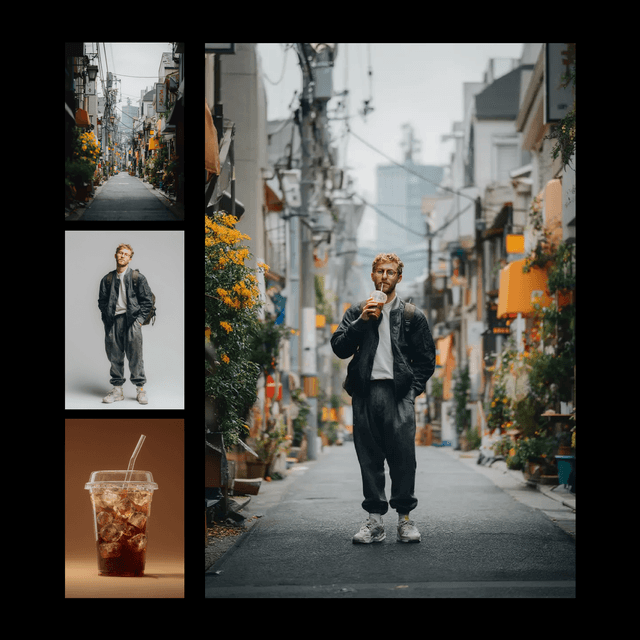
工作流程內部
節點圖的唯讀預覽。請在 Comfy Cloud 中開啟,或下載後編輯節點。
Loading the graph
Open full-size workflow preview- 作者
- ComfyUI
需要自訂節點
- 正在讀取工作流程
從程式碼使用此工作流程
可行時會根據工作流程圖和輸入內容產生;否則會顯示儲存的範例。執行可能產生費用的程式碼前,請檢查認證資訊和端點。
1 取得 API 金鑰 ↗
What you need
- Runs on
- Comfy Cloud
- 金鑰
- COMFY_API_KEY
- 您的檔案
- 由程式碼透過其 URL 上傳
需要付費 Cloud 方案與點數。
下載 API JSONAPI 文件 ↗
# Python 3.10+: pip install comfy-sdk==0.4.0
import os

from comfy_sdk import Comfy

api_key = os.environ.get("COMFY_API_KEY", "").strip()
if not api_key: raise RuntimeError("Set COMFY_API_KEY")
os.environ.setdefault("COMFY_BASE_URL", "https://cloud.comfy.org")
client = Comfy(api_key=api_key)
workflow = client.workflows.from_json({
    "1": {
        "class_type": "ReveImageRemixNode",
        "inputs": {
            "model": "reve-remix@20250915",
            "model.aspect_ratio": "auto",
            "model.test_time_scaling": 1,
            "prompt": "<img>0</img> is holding <img>1</img> to his mouth as if drinking from it, standing in <img>2</img>, preserve character identity, preserve original scene, no change to facial features, no change to environment, photorealistic street photography, high detail, natural lighting, cohesive composition.",
            "reference_images.image_0": [
                "4",
                0
            ],
            "reference_images.image_1": [
                "2",
                0
            ],
            "reference_images.image_2": [
                "5",
                0
            ],
            "remove_background": False,
            "seed": 770904838,
            "upscale": "enabled",
            "upscale.upscale_factor": 2
        },
        "_meta": {
            "title": "Reve Image Remix"
        }
    },
    "2": {
        "class_type": "LoadImage",
        "inputs": {
            "image": "UPLOADED_image_3_FILENAME"
        },
        "_meta": {
            "title": "Load Image"
        }
    },
    "3": {
        "class_type": "SaveImage",
        "inputs": {
            "filename_prefix": "Reve_image_remix",
            "images": [
                "1",
                0
            ]
        },
        "_meta": {
            "title": "Save Image"
        }
    },
    "4": {
        "class_type": "LoadImage",
        "inputs": {
            "image": "UPLOADED_image_FILENAME"
        },
        "_meta": {
            "title": "Load Image"
        }
    },
    "5": {
        "class_type": "LoadImage",
        "inputs": {
            "image": "UPLOADED_image_2_FILENAME"
        },
        "_meta": {
            "title": "Load Image"
        }
    }
})
# Replace each example.com URL with a public URL of your file.
workflow.set_input("4", "image", client.assets.from_url("https://example.com/replace-with-a-url/image"))
workflow.set_input("5", "image", client.assets.from_url("https://example.com/replace-with-a-url/image_2"))
workflow.set_input("2", "image", client.assets.from_url("https://example.com/replace-with-a-url/image_3"))

# run() also passes api_key to the partner nodes in this workflow.
job = client.run(workflow, api_key=api_key)問答
可以,您可用 LoadImage 節點輸入多張參考圖,ReveImageRemixNode 會將它們融合為單一輸出。
流程支援常見影像格式,如 JPEG 與 PNG,作為輸入與輸出。
可在 ReveImageRemixNode 內調整融合參數,控制每張參考圖對最終輸出的影響程度。
目前流程會直接處理並儲存圖像,您可多次調整設定並執行以預覽不同變化。