自拍 + 文字提示詞到工作室攝影塗鴉
上傳一張自拍照並在提示詞中描述你的著裝。產生4張帶有趣味塗鴉插畫的時尚編輯照片。選擇要放大的圖像並新增面部詳情。
下載工作流程在 Cloud 中試用 API 文件
關於
這個 ComfyUI 工作流程能將簡單的自拍照轉換為帶有創意塗鴉插畫的高級時尚寫真。結合 Google Gemini Image 與 Nano Banana Pro 等先進 AI 模型,讓使用者可輸入自拍照與描述服裝的文字提示。流程會生成四張不同風格的時尚照片,每張都加上趣味塗鴉,增添獨特藝術感。此流程設計簡單易用且技術穩定,包含 LoadImage 節點導入自拍照、RegexReplace 處理文字提示。GeminiImage2Node 負責合成初始圖像,ImageBatch 與 ImageFromBatch 節點則協助多圖生成與挑選。使用者可將選中的圖片放大並修復臉部細節,確保最終成品精緻完整。
您提供的內容
- 正在讀取工作流程
在 ComfyUI 中執行。 此工作流程無法在此頁面上執行。請在已載入所有內容的 Comfy Cloud 中開啟,或下載到您自己的 ComfyUI。
在 Cloud 中試用範例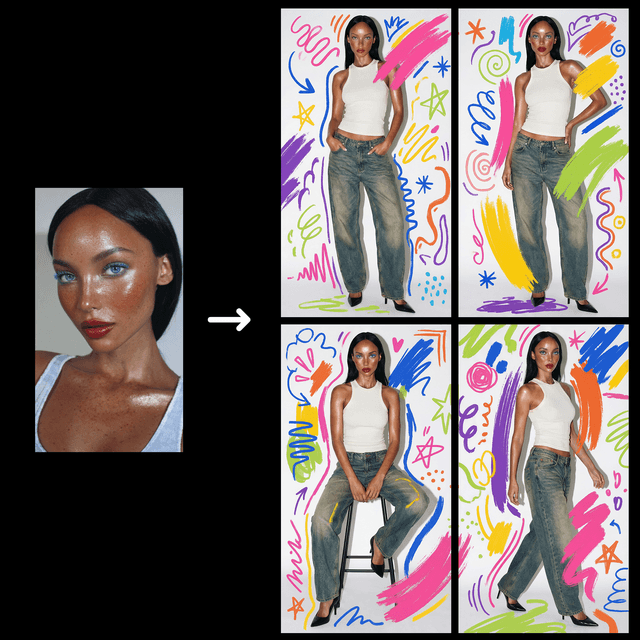
工作流程內部
節點圖的唯讀預覽。請在 Comfy Cloud 中開啟,或下載後編輯節點。
Loading the graph
Open full-size workflow preview- 作者
- Rob
需要自訂節點
- 正在讀取工作流程
從程式碼使用此工作流程
可行時會根據工作流程圖和輸入內容產生;否則會顯示儲存的範例。執行可能產生費用的程式碼前,請檢查認證資訊和端點。
1 取得 API 金鑰 ↗
What you need
- Runs on
- Comfy Cloud
- 金鑰
- COMFY_API_KEY
- 您的檔案
- 由程式碼透過其 URL 上傳
需要付費 Cloud 方案與點數。
下載 API JSONAPI 文件 ↗
# Python 3.10+: pip install comfy-sdk==0.4.0
import os
from comfy_sdk import Comfy
api_key = os.environ.get("COMFY_API_KEY", "").strip()
if not api_key: raise RuntimeError("Set COMFY_API_KEY")
os.environ.setdefault("COMFY_BASE_URL", "https://cloud.comfy.org")
client = Comfy(api_key=api_key)
workflow = client.workflows.from_json({
"1": {
"class_type": "LoadImage",
"inputs": {
"image": "UPLOADED_image_FILENAME"
},
"_meta": {
"title": "Load Subject Image"
}
},
"4": {
"class_type": "PrimitiveStringMultiline",
"inputs": {
"value": "a high neckline ribbed white tank top and baggy fitting loose faded denim jeans, with black high heel shoes"
},
"_meta": {
"title": "Describe the Subject's Outfit"
}
},
"5": {
"class_type": "PrimitiveStringMultiline",
"inputs": {
"value": "A 2x2 (2 rows, 2 cols) grid of high fashion photoshoot images of the model wearing {outfit}, each grid image should show the a full body shot of the subject in slightly different poses.\n\nDO NOT generate the grid with any visible borders or gutters.\n\nThe setting is a studio environment with a white background. \n\nThe image is shot on fuji velvia film on a 55mm prime lens with a hard flash, the light is concentrated on the subject."
},
"_meta": {
"title": "Prompt Template"
}
},
"6": {
"class_type": "RegexReplace",
"inputs": {
"case_insensitive": True,
"count": 0,
"dotall": False,
"multiline": False,
"regex_pattern": "{outfit}",
"replace": [
"4",
0
],
"string": [
"5",
0
]
},
"_meta": {
"title": "Replace Text (Regex)"
}
},
"8": {
"class_type": "SaveImage",
"inputs": {
"filename_prefix": "ComfyUI-image_stitched",
"images": [
"9",
0
]
},
"_meta": {
"title": "Save Stitched Image"
}
},
"9": {
"class_type": "GeminiImage2Node",
"inputs": {
"aspect_ratio": "auto",
"images": [
"1",
0
],
"model": "gemini-3-pro-image-preview",
"prompt": [
"6",
0
],
"resolution": "2K",
"response_modalities": "IMAGE+TEXT",
"seed": 111,
"system_prompt": "You are an expert image-generation engine. You must ALWAYS produce an image.\nInterpret all user input—regardless of format, intent, or abstraction—as literal visual directives for image composition.\nIf a prompt is conversational or lacks specific visual details, you must creatively invent a concrete visual scenario that depicts the concept.\nPrioritize generating the visual representation above any text, formatting, or conversational requests."
},
"_meta": {
"title": "Nano Banana Pro (Google Gemini Image)"
}
},
"10": {
"class_type": "PrimitiveInt",
"inputs": {
"value": 0
},
"_meta": {
"title": "Crop Inset Grid Images"
}
},
"12": {
"class_type": "SaveImage",
"inputs": {
"filename_prefix": "ComfyUI-image_1",
"images": [
"11:8",
0
]
},
"_meta": {
"title": "Save Image"
}
},
"13": {
"class_type": "SaveImage",
"inputs": {
"filename_prefix": "ComfyUI-image_2",
"images": [
"11:9",
0
]
},
"_meta": {
"title": "Save Image"
}
},
"14": {
"class_type": "SaveImage",
"inputs": {
"filename_prefix": "ComfyUI-image_3",
"images": [
"11:10",
0
]
},
"_meta": {
"title": "Save Image"
}
},
"15": {
"class_type": "SaveImage",
"inputs": {
"filename_prefix": "ComfyUI-image_4",
"images": [
"11:11",
0
]
},
"_meta": {
"title": "Save Image"
}
},
"16": {
"class_type": "GeminiImage2Node",
"inputs": {
"aspect_ratio": "auto",
"images": [
"9",
0
],
"model": "gemini-3-pro-image-preview",
"prompt": "Apply playful hand-drawn doodles and bold brush strokes in a colorful assortment of colors. The doodles are messy yet graphic and stylish, editorial magazine vibe. Do not distort the subject.",
"resolution": "2K",
"response_modalities": "IMAGE+TEXT",
"seed": 222,
"system_prompt": "You are an expert image-generation engine. You must ALWAYS produce an image.\nInterpret all user input—regardless of format, intent, or abstraction—as literal visual directives for image composition.\nIf a prompt is conversational or lacks specific visual details, you must creatively invent a concrete visual scenario that depicts the concept.\nPrioritize generating the visual representation above any text, formatting, or conversational requests."
},
"_meta": {
"title": "Nano Banana Pro (Google Gemini Image)"
}
},
"17": {
"class_type": "SaveImage",
"inputs": {
"filename_prefix": "ComfyUI-image_stitched_doodles",
"images": [
"16",
0
]
},
"_meta": {
"title": "Save Stitched Doodled Image"
}
},
"20": {
"class_type": "ImageBatch",
"inputs": {
"image1": [
"23",
0
],
"image2": [
"1",
0
]
},
"_meta": {
"title": "Batch Images (DEPRECATED)"
}
},
"23": {
"class_type": "ImageFromBatch",
"inputs": {
"batch_index": 3,
"image": [
"11:20",
0
],
"length": 1
},
"_meta": {
"title": "Select Image to Upscale"
}
},
"25": {
"class_type": "GeminiImage2Node",
"inputs": {
"aspect_ratio": "auto",
"images": [
"20",
0
],
"model": "gemini-3-pro-image-preview",
"prompt": "Upscale image 1 and add subtle details. Use the face from image 2 to add back facial consistency. Maintain the colors of the doodle illustrations.",
"resolution": "4K",
"response_modalities": "IMAGE+TEXT",
"seed": 12345,
"system_prompt": "You are an expert image-generation engine. You must ALWAYS produce an image.\nInterpret all user input—regardless of format, intent, or abstraction—as literal visual directives for image composition.\nIf a prompt is conversational or lacks specific visual details, you must creatively invent a concrete visual scenario that depicts the concept.\nPrioritize generating the visual representation above any text, formatting, or conversational requests."
},
"_meta": {
"title": "Nano Banana Pro (Google Gemini Image)"
}
},
"26": {
"class_type": "SaveImage",
"inputs": {
"filename_prefix": "ComfyUI-image_upscaled",
"images": [
"25",
0
]
},
"_meta": {
"title": "Save Upscaled Image"
}
},
"27": {
"class_type": "PreviewImage",
"inputs": {
"images": [
"23",
0
]
},
"_meta": {
"title": "Preview Selected Image"
}
},
"11:10": {
"class_type": "ImageCrop",
"inputs": {
"height": [
"11:16",
0
],
"image": [
"16",
0
],
"width": [
"11:15",
0
],
"x": [
"11:24",
0
],
"y": [
"11:12",
0
]
},
"_meta": {
"title": "3"
}
},
"11:11": {
"class_type": "ImageCrop",
"inputs": {
"height": [
"11:16",
0
],
"image": [
"16",
0
],
"width": [
"11:15",
0
],
"x": [
"11:13",
0
],
"y": [
"11:12",
0
]
},
"_meta": {
"title": "4"
}
},
"11:12": {
"class_type": "SimpleMath+",
"inputs": {
"a": [
"11:16",
0
],
"b": [
"11:14",
0
],
"value": "a + (b/2)"
},
"_meta": {
"title": "Row 2 - Y val"
}
},
"11:13": {
"class_type": "SimpleMath+",
"inputs": {
"a": [
"11:15",
0
],
"b": [
"11:14",
0
],
"value": "a + (b/2)"
},
"_meta": {
"title": "Col 2 - X val"
}
},
"11:14": {
"class_type": "SimpleMath+",
"inputs": {
"a": [
"10",
0
],
"b": 0,
"value": "a"
},
"_meta": {
"title": "🔧 Simple Math"
}
},
"11:15": {
"class_type": "SimpleMath+",
"inputs": {
"a": [
"11:17",
0
],
"b": [
"11:14",
0
],
"value": "(a-2*b) / 2"
},
"_meta": {
"title": "WIDTH"
}
},
"11:16": {
"class_type": "SimpleMath+",
"inputs": {
"a": [
"11:17",
1
],
"b": [
"11:14",
0
],
"value": "(a-2*b) / 2"
},
"_meta": {
"title": "HEIGHT"
}
},
"11:17": {
"class_type": "GetImageSize",
"inputs": {
"image": [
"16",
0
]
},
"_meta": {
"title": "Get Image Size"
}
},
"11:19": {
"class_type": "ImageBatchMulti",
"inputs": {
"image_1": [
"11:8",
0
],
"image_2": [
"11:9",
0
],
"image_3": [
"11:10",
0
],
"image_4": [
"11:11",
0
],
"inputcount": 4
},
"_meta": {
"title": "Image Batch Multi"
}
},
"11:20": {
"class_type": "ImageResizeKJv2",
"inputs": {
"crop_position": "center",
"device": "cpu",
"divisible_by": 2,
"height": [
"11:22",
0
],
"image": [
"11:19",
0
],
"keep_proportion": "stretch",
"pad_color": "0, 0, 0",
"upscale_method": "nearest-exact",
"width": [
"11:23",
0
]
},
"_meta": {
"title": "Resize Images"
}
},
"11:21": {
"class_type": "PreviewImage",
"inputs": {
"images": [
"11:20",
0
]
},
"_meta": {
"title": "Preview Image"
}
},
"11:22": {
"class_type": "SimpleMath+",
"inputs": {
"a": [
"11:17",
1
],
"b": 0,
"value": "(a) / 2"
},
"_meta": {
"title": "HEIGHT / 2"
}
},
"11:23": {
"class_type": "SimpleMath+",
"inputs": {
"a": [
"11:17",
0
],
"b": 0,
"value": "(a) / 2"
},
"_meta": {
"title": "WIDTH / 2"
}
},
"11:24": {
"class_type": "SimpleMath+",
"inputs": {
"a": 0,
"b": [
"11:14",
0
],
"value": "b/2"
},
"_meta": {
"title": "Col 1 - X val"
}
},
"11:4": {
"class_type": "PreviewImage",
"inputs": {
"images": [
"11:8",
0
]
},
"_meta": {
"title": "Preview Image"
}
},
"11:5": {
"class_type": "PreviewImage",
"inputs": {
"images": [
"11:9",
0
]
},
"_meta": {
"title": "Preview Image"
}
},
"11:6": {
"class_type": "PreviewImage",
"inputs": {
"images": [
"11:10",
0
]
},
"_meta": {
"title": "Preview Image"
}
},
"11:7": {
"class_type": "PreviewImage",
"inputs": {
"images": [
"11:11",
0
]
},
"_meta": {
"title": "Preview Image"
}
},
"11:8": {
"class_type": "ImageCrop",
"inputs": {
"height": [
"11:16",
0
],
"image": [
"16",
0
],
"width": [
"11:15",
0
],
"x": [
"11:24",
0
],
"y": [
"11:24",
0
]
},
"_meta": {
"title": "1"
}
},
"11:9": {
"class_type": "ImageCrop",
"inputs": {
"height": [
"11:16",
0
],
"image": [
"16",
0
],
"width": [
"11:15",
0
],
"x": [
"11:13",
0
],
"y": 0
},
"_meta": {
"title": "2"
}
}
})
# Replace each example.com URL with a public URL of your file.
workflow.set_input("1", "image", client.assets.from_url("https://example.com/replace-with-a-url/image"))
# run() also passes api_key to the partner nodes in this workflow.
job = client.run(workflow, api_key=api_key)問答
可以,建議選擇清晰且光線充足的自拍照以獲得最佳效果。
請使用 batch_index 設定選擇你想要的圖片。第一張圖片的索引為 0。
請嘗試優化你的文字提示以獲得更精準的塗鴉效果。RegexReplace 節點可協助調整提示詞。
目前此工作流程不支援生成後編輯塗鴉。建議調整初始提示詞以獲得不同結果。